Onboarding & Integration Guide
The Apptrove WebSDK is a lightweight, asynchronous JavaScript library designed to track user sessions and conversion events within Progressive Web Apps (PWAs) and websites. It enables attribution by generating a unique session identifier and syncing it with user-defined actions.
Installation & Initialization
To integrate the SDK, place the following script as high as possible in the <head> section of your HTML. This ensures the tracker initializes before other page elements load.
Implementation Script:
<script>
  (function (e, n, t, s, a, o, A, c, T) {
    (e.ATSdkObject  "AT"),
      (e.AT
        e.AT
        function () {
          (e.AT.q  e.AT.q  []).push(
            [Date.now()].concat(Array.prototype.slice.call(arguments))
          );
        }),
      (e.AT.id  e.AT.id  A),
      (e.AT.plugins  {}),
      (c  n.createElement(t)),
      (T  n.getElementsByTagName(t)[0]),
      (c.async  1),
      (c.src
        https://websdk.apptrove.com?" +
        (o.length  0  "st="  o.split(",").sort().join(",")  "&" : "")
        (A.length  0  "at_id="  A : "")),
      T.parentNode.insertBefore(c, T);
  })(window, document, "script", 0, "AT", "pwa", "YOUR_APP_ID");
<script/>
Action Required
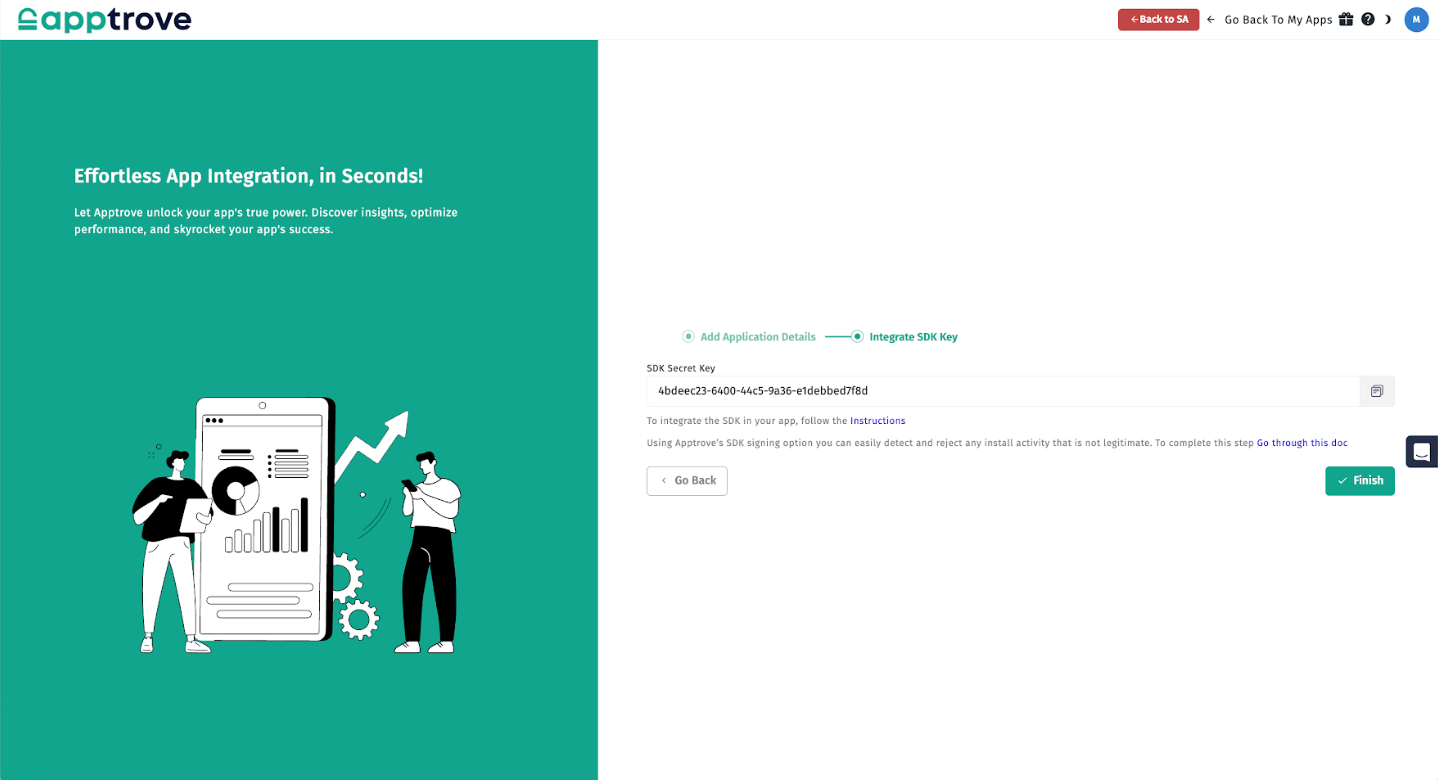
Replace "YOUR_APP_ID" in the last line with the SDK Secret Key provided in your Apptrove Dashboard.
SDK Secret Key — Apptrove Dashboard: