Meta Deferred Deep Link Integration (Android)
Overview
This guide explains how to integrate Meta Deferred Deep Linking using the Meta Android SDK, and retrieve the deferred deep link URL after a user installs the application from a Meta App Promotion campaign.
This integration is useful when:
- Running App Promotion campaigns on Meta
- Configuring a Deferred Deep Link URL in Ads Manager
- Opening a specific screen after first install
- Passing custom parameters to the application
This integration retrieves the deferred deep link configured in Meta. It does not return Meta attribution data such as Campaign ID, Ad Set ID, Ad ID, or Click ID. Those values are only available through Meta's attribution/SAN integrations, not through the mobile SDK.
Prerequisites
- Android application registered in the Meta Developer Console
- Meta Android SDK added to the project
- Facebook App ID configured
- App Promotion campaign created, with a Deferred Deep Link URL configured in Ads Manager
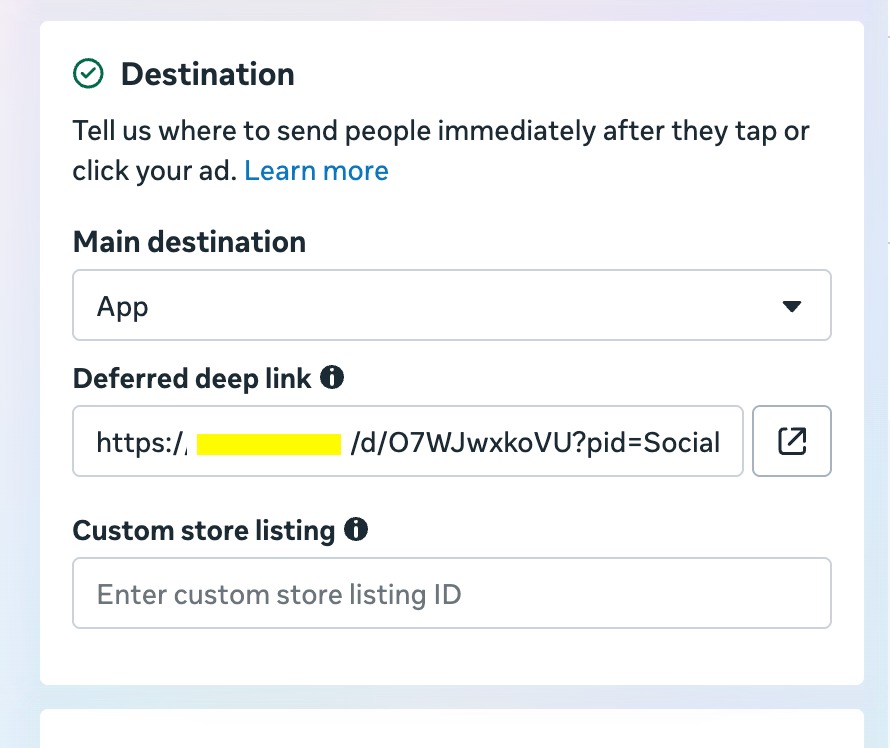
Example Deferred Deep Link:
https://dl.apptrove.com/open?screen=payment&coupon=WELCOME50
Step 1: Add the Meta Android SDK
dependencies {
    implementation "com.facebook.android:facebook-android-sdk:<latest-version>"
}
Replace <latest-version> with the latest stable version recommended by Meta.
Step 2: Configure AndroidManifest.xml
<meta-data
    android:name="com.facebook.sdk.ApplicationId"
    android:value="@string/facebook_app_id" />
<string name="facebook_app_id">123456789012345</string>
Step 3: Initialize the Facebook SDK
class MyApplication : Application() {
    override fun onCreate() {
        super.onCreate()
        FacebookSdk.sdkInitialize(applicationContext)
        AppEventsLogger.activateApp(this)
    }
}
Step 4: Fetch the Deferred Deep Link
Call the Meta SDK API after the application starts:
import com.facebook.applinks.AppLinkData

AppLinkData.fetchDeferredAppLinkData(this) { appLinkData ->
    if (appLinkData == null) {
        Log.d("Meta", "No Deferred Deep Link Found")
        return@fetchDeferredAppLinkData
    }
    val targetUri = appLinkData.targetUri
    Log.d("Meta", "Deferred Deep Link = $targetUri")
}
The SDK asynchronously contacts Meta and returns an AppLinkData object if a deferred app link is available. If none exists, the callback receives null.
Step 5: Parse Query Parameters
Example Deferred Deep Link:
https://dl.apptrove.com/open?screen=payment&coupon=WELCOME50&user_type=new
val screen = targetUri?.getQueryParameter("screen")
val coupon = targetUri?.getQueryParameter("coupon")
val userType = targetUri?.getQueryParameter("user_type")
Example output: screen = payment, coupon = WELCOME50, userType = new
Step 6: Pass the URL to AppTrove SDK (Optional)
If AppTrove should process the deferred deep link, pass the resolved URI to AppTroveSDK.parseDeepLink(uri) so it can parse custom parameters, open the correct in-app destination, and record the deep link for analytics:
AppLinkData.fetchDeferredAppLinkData(this) { appLinkData ->
    val uri = appLinkData?.targetUri
    if (uri != null) {
        AppTroveSDK.parseDeepLink(uri)
    }
}
Complete Example
class MainActivity : AppCompatActivity() {
    override fun onCreate(savedInstanceState: Bundle?) {
        super.onCreate(savedInstanceState)

        AppLinkData.fetchDeferredAppLinkData(this) { appLinkData ->
            if (appLinkData == null) {
                Log.d("Meta", "No Deferred Deep Link")
                return@fetchDeferredAppLinkData
            }

            val uri = appLinkData.targetUri
            val screen = uri?.getQueryParameter("screen")
            val coupon = uri?.getQueryParameter("coupon")
            Log.d("Meta", "Deferred URI = $uri, Screen = $screen, Coupon = $coupon")

            AppTroveSDK.parseDeepLink(uri)
        }
    }
}
Example Flow
User clicks Meta Ad
      │
      ▼
  Play Store → App Installed → App First Launch
      │
      ▼
Meta SDK: fetchDeferredAppLinkData()
      │
      ▼
Meta Server returns:
https://dl.apptrove.com/open?screen=payment&coupon=WELCOME50
      │
      ▼
Application parses parameters → AppTrove SDK
What Can Be Retrieved
- Deferred deep link URL
- Custom query parameters
- Promotion code (if configured)
- App Link arguments bundle
The AppLinkData object also provides methods such as getTargetUri(), getRef(), getPromotionCode(), getArgumentBundle(), and getRefererData().
What Cannot Be Retrieved
The Meta Android SDK does not expose attribution data through fetchDeferredAppLinkData():
- Campaign ID / Campaign Name
- Ad Set ID / Ad Set Name
- Ad ID
- Click ID
- Impression ID
Attribution data is handled separately through Meta's attribution/SAN infrastructure rather than the client SDK.
Best Practices
- Call
fetchDeferredAppLinkData()only once, during the first application launch - Handle the case where no deferred deep link is returned
- Validate and sanitize all query parameters before using them
- Keep deferred deep links focused on routing and user experience rather than attribution
- If using AppTrove, pass the returned URI to the AppTrove SDK so it can process and store the deep link consistently
Testing
Method 1: Quick Sanity Check (Meta App Ads Helper)
Use this to verify your SDK integration and app-side logic are wired up correctly. It does not guarantee real ad performance.
- Go to the Meta App Ads Helper
- Select your app and click Test Deep Link
- Enter a deep link URL (e.g.
myapp://product/123) and check Send Deferred - Uninstall the app from the test device
- Tap the resulting notification in the Facebook app. It redirects to the Play Store
- Reinstall the app (via Internal Testing track or a debug build) and open it
- Check the log output of
fetchDeferredAppLinkData(). It should resolve with the URL you entered
Ad previews cannot be used for this test. Meta has confirmed that deferred deep links fail when an ad preview is sent to your own device due to technical constraints on their side.
Method 2: End-to-End Test (Real Ad)
This is the definitive test, since it replicates the exact flow a real user goes through.
- Fully uninstall the app from the test device (force-stopping is not enough)
- In Meta Ads Manager, create a real App Promotion campaign and set the Deferred Deep Link field on the ad (see Prerequisites). A low-budget ad is enough
- Send the ad to your test device as a notification from Ads Manager, open it in the Facebook app, and tap the ad's call to action to go to the Play Store
- Install and launch the app
- On first launch,
fetchDeferredAppLinkData()should return the deep link URL from the ad
Why a Retest on the Same Ad Returns null
Meta's backend delivers deferred deep link data only once per ad click. Once your app successfully fetches it, the server marks that click as fulfilled. Uninstalling and reinstalling the app and clicking the same ad again will not return data a second time. To test again, click a new ad (or a new ad creative).
| Scenario | Result |
|---|---|
| Same ad, first install | ✅ Returns data |
| Same ad, uninstall + reinstall | ❌ Returns null (expected) |
| New ad, first install | ✅ Returns data |
| Ad preview | ❌ May fail (technical limitation, not a bug) |
Troubleshooting
| Issue | Possible Cause |
|---|---|
appLinkData is null | No deferred deep link is associated with the install, the campaign wasn't configured with one, or the app isn't eligible for a deferred app link |
targetUri is null | The deferred app link did not include a target URL |
| Parameters missing | Verify the configured deferred deep link URL in Meta Ads Manager and ensure the parameters are part of the URL |
| Callback not invoked as expected | Confirm the Meta SDK is initialized correctly and the Facebook App ID is configured |
Works once, then returns null on retest | Expected. See Why a Retest on the Same Ad Returns null above |