Overview
This guide provides instructions for implementing deep linking with the Apptrove .NET MAUI SDK.
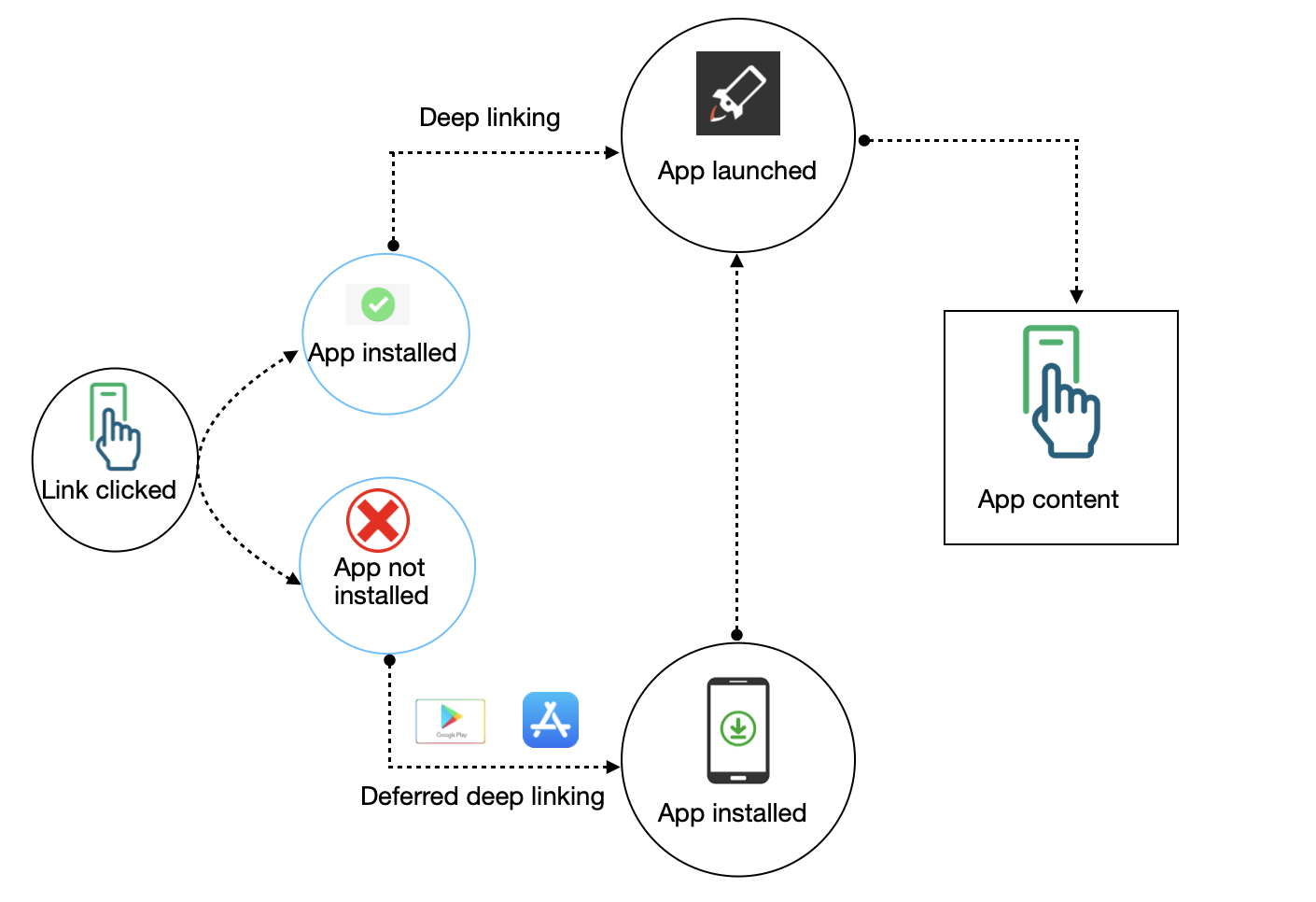
Deep Linking Types
- Normal Deep Linking: Opens app directly to specific content (app already installed)
- Deferred Deep Linking: Redirects to app store first, then to specific content after install
Important
The DeferredDeeplinkCallback handles both normal and deferred deep links. You will receive the deep link URL in the callback regardless of how the user arrived.
Key Points:
- Set
DeferredDeeplinkCallbackbefore callingInitialize()to receive deep link URLs - The callback receives the full resolved URL with all parameters
- Call
ParseDeepLink(url)after SDK is initialized to send incoming URLs for attribution - On iOS, call
SubscribeAttributionLink()afterInitialize()to enable deferred deep link attribution - If a deep link arrives before SDK initialization, store it and process after init
Setup Steps
Step 1: Configure SDK with Callback (App.xaml.cs)
Set the DeferredDeeplinkCallback before calling Initialize() to receive deep link URLs.
using AppTroveSDK.Maui;

public partial class App : Application
{
    private static bool _sdkInitialized = false;
    private static string? _pendingDeepLink = null;

    public App()
    {
        InitializeComponent();
    }

    protected override async void OnStart()
    {
        base.OnStart();
        await InitializeSDKAsync();
    }

    public static async Task InitializeSDKAsync()
    {
        var config = new AppTroveSDKConfig("your-sdk-key", AppTroveEnvironment.Production);

        // This callback receives BOTH normal and deferred deep links
        config.DeferredDeeplinkCallback = (url) =>
        {
            Console.WriteLine($"Deep link received: {url}");
            // Handle your navigation here
        };

        AppTroveSDK.Initialize(config);
        _sdkInitialized = true;

        // iOS only: Call after Initialize()
#if IOS
        AppTroveSDK.SubscribeAttributionLink();
#endif

        // Process any pending deep link
        if (!string.IsNullOrEmpty(_pendingDeepLink))
        {
            AppTroveSDK.ParseDeepLink(_pendingDeepLink);
            _pendingDeepLink = null;
        }
    }

    // Called from platform code when deep link is received
    public static void HandleIncomingDeepLink(string url)
    {
        if (string.IsNullOrEmpty(url)) return;

        if (_sdkInitialized)
        {
            AppTroveSDK.ParseDeepLink(url);
        }
        else
        {
            _pendingDeepLink = url;
        }
    }
}
Step 2: Android Setup (MainActivity.cs)
Add intent filters and handle incoming deep links.
using Android.App;
using Android.Content;
using Android.Content.PM;
using Android.OS;

namespace YourApp;

[Activity(
    Theme = "@style/Maui.SplashTheme",
    MainLauncher = true,
    LaunchMode = LaunchMode.SingleTask,
    ConfigurationChanges = ConfigChanges.ScreenSize | ConfigChanges.Orientation | ConfigChanges.UiMode | ConfigChanges.ScreenLayout | ConfigChanges.SmallestScreenSize | ConfigChanges.Density)]

// Deep Link: https://yourdomain.u9ilnk.me
[IntentFilter(
    new[] { Intent.ActionView },
    Categories = new[] { Intent.CategoryDefault, Intent.CategoryBrowsable },
    DataScheme = "https",
    DataHost = "yourdomain.u9ilnk.me",
    AutoVerify = true)]

// Also support http
[IntentFilter(
    new[] { Intent.ActionView },
    Categories = new[] { Intent.CategoryDefault, Intent.CategoryBrowsable },
    DataScheme = "http",
    DataHost = "yourdomain.u9ilnk.me")]

// Custom scheme
[IntentFilter(
    new[] { Intent.ActionView },
    Categories = new[] { Intent.CategoryDefault, Intent.CategoryBrowsable },
    DataScheme = "yourapp",
    DataHost = "app")]

public class MainActivity : MauiAppCompatActivity
{
    protected override void OnCreate(Bundle? savedInstanceState)
    {
        base.OnCreate(savedInstanceState);
        HandleDeepLink(Intent);
    }

    protected override void OnNewIntent(Intent? intent)
    {
        base.OnNewIntent(intent);
        if (intent != null)
        {
            HandleDeepLink(intent);
        }
    }

    private void HandleDeepLink(Intent? intent)
    {
        if (intent?.Data != null)
        {
            App.HandleIncomingDeepLink(intent.Data.ToString()!);
        }
    }
}
Step 3: iOS Setup
Entitlements.plist
<key>com.apple.developer.associated-domains</key>
<array>
    <string>applinks:yourdomain.u9ilnk.me</string>
</array>
Info.plist (URL Scheme)
<key>CFBundleURLTypes</key>
<array>
    <dict>
        <key>CFBundleTypeRole</key>
        <string>Editor</string>
        <key>CFBundleURLSchemes</key>
        <array>
            <string>yourapp</string>
        </array>
    </dict>
</array>
AppDelegate.cs
using Foundation;
using UIKit;

namespace YourApp;

[Register("AppDelegate")]
public class AppDelegate : MauiUIApplicationDelegate
{
    protected override MauiApp CreateMauiApp() => MauiProgram.CreateMauiApp();

    // Handle Universal Links
    public override bool ContinueUserActivity(UIApplication application,
        NSUserActivity userActivity, UIApplicationRestorationHandler completionHandler)
    {
        if (userActivity.ActivityType == NSUserActivityType.BrowsingWeb
            && userActivity.WebPageUrl != null)
        {
            App.HandleIncomingDeepLink(userActivity.WebPageUrl.AbsoluteString);
            return true;
        }
        return base.ContinueUserActivity(application, userActivity, completionHandler);
    }

    // Handle URL Scheme
    public override bool OpenUrl(UIApplication application, NSUrl url, NSDictionary options)
    {
        App.HandleIncomingDeepLink(url.AbsoluteString);
        return true;
    }
}
tip
Make sure your Apple Developer account has the Associated Domains capability enabled for your App ID.
Important Notes
| Function | When to Call | Purpose |
|---|---|---|
DeferredDeeplinkCallback | Before Initialize() | Receives deep link URLs (both normal and deferred) |
SubscribeAttributionLink() | After Initialize() | iOS only - enables deferred deep link attribution |
ParseDeepLink(url) | After Initialize() | Send incoming deep link to SDK for attribution |
Resolve Deep Link URL
Use ResolveDeeplinkUrl to resolve a short Trackier URL and get all the parameters. This is useful when you have a short link and want to get the full destination URL with parameters.
// Resolve a short URL to get full parameters
var result = await AppTroveSDK.ResolveDeeplinkUrl("https://yourdomain.u9ilnk.me/d/NKmWH9E7b1");

if (result != null && result.Count > 0)
{
    foreach (var kvp in result)
    {
        Console.WriteLine($"{kvp.Key}: {kvp.Value}");
    }
}
Example Output:
dlv: FirstProduct
quantity: 10
pid: sms
campaign: summer_sale
Troubleshooting
| Issue | Solution |
|---|---|
| Deep link not opening app | Check intent filter (Android) or Entitlements (iOS) |
| Callback not receiving URL | Ensure callback is set before Initialize() |
| iOS deferred not working | Call SubscribeAttributionLink() after Initialize() |
| Link received before SDK init | Use pending deep link pattern shown above |
For support, contact support@trackier.com.