SDK Signing
SDK Version Selection
Use the tabs below for SDK-specific signing implementation.
SDK-Specific Quick Signing Setup
- ✓ Apptrove SDK (Recommended)
- Trackier SDK (Deprecating August 2026)
import { AppTroveConfig, AppTroveSDK } from 'apptrove-expo-sdk';

const sdkConfig = new AppTroveConfig(TR_SDK_KEY, AppTroveConfig.EnvironmentDevelopment);
sdkConfig.setAppSecret('your_secret_id', 'your_secret_key');
AppTroveSDK.initialize(sdkConfig);
import { TrackierConfig, TrackierSDK } from 'trackier-expo-sdk';

const sdkConfig = new TrackierConfig(TR_SDK_KEY, TrackierConfig.EnvironmentDevelopment);
sdkConfig.setAppSecret('your_secret_id', 'your_secret_key');
TrackierSDK.initialize(sdkConfig);
SDK signing enhances the security of your Apptrove Expo SDK integration by authenticating API requests with a secretId and secretKey. This ensures that tracking data is securely attributed to your app, preventing unauthorized access.
Purpose
SDK signing provides security for your attribution implementation:
- Request Authentication: All API requests are signed with unique credentials
- Data Integrity: Ensures tracking data cannot be tampered with
- Fraud Prevention: Prevents unauthorized access to your attribution data
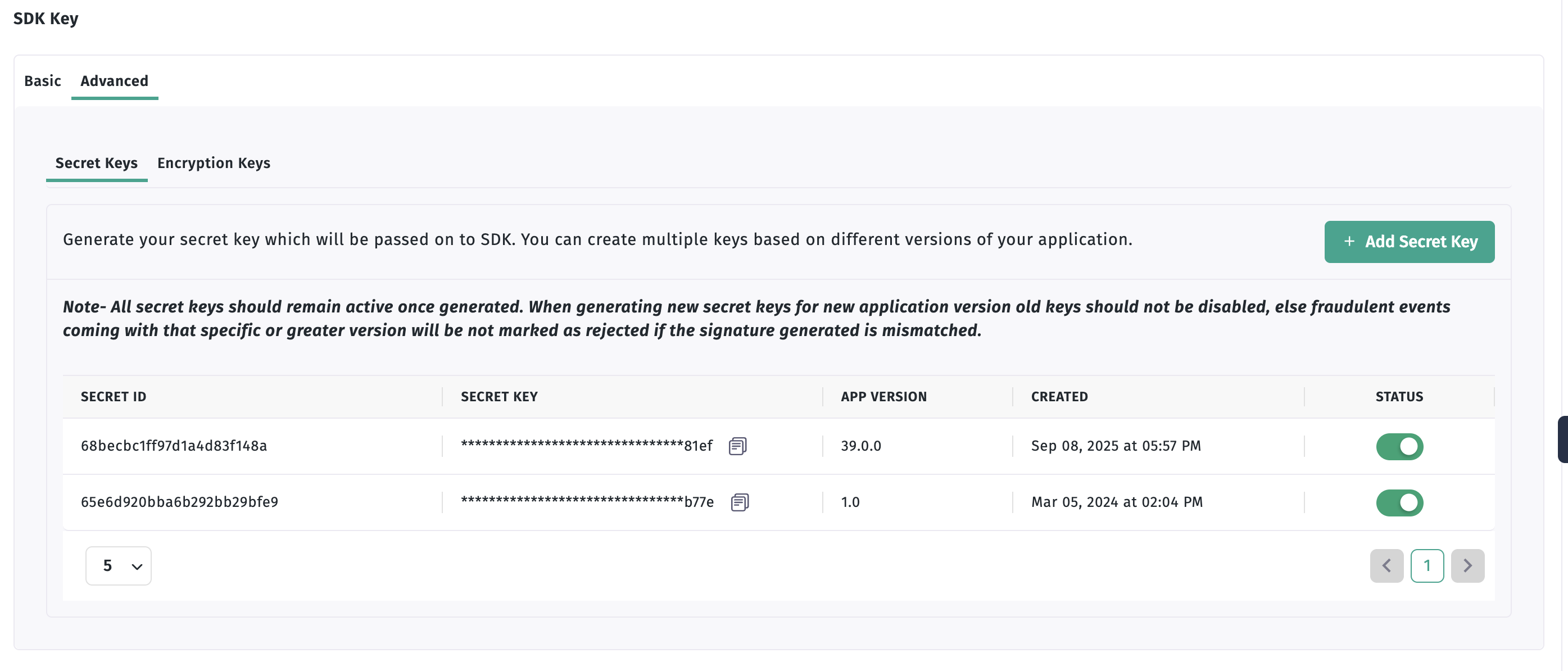
Retrieving Your Secret ID and Key
- Login to your Apptrove Panel and select your application
- In the Dashboard, click the three dots in the left bottom corner
- Click on the "Advanced" tab to access signing credentials
- Click on the "Add secret key" button to generate your secret ID and key
important
Keep your secret credentials secure and never expose them in client-side code.
Implementation
SDK signing is configured during SDK initialization using the setAppSecret method.
Basic Configuration
- ✓ Apptrove SDK (Recommended)
- Trackier SDK (Deprecating August 2026)
import React, { useEffect } from 'react';
import { AppTroveConfig, AppTroveSDK } from 'apptrove-expo-sdk';

export default function App() {
  useEffect(() => {
    const TR_SDK_KEY = "XXXXXXX-XXXX-XXXX-80e3-5938fadff";

    const appTroveConfig = new AppTroveConfig(TR_SDK_KEY, AppTroveConfig.EnvironmentDevelopment);

    // Configure SDK signing
    appTroveConfig.setAppSecret("your_secret_id", "your_secret_key");

    AppTroveSDK.initialize(appTroveConfig);
  }, []);

  return (
    // Your app content
  );
}
import React, { useEffect } from 'react';
import { TrackierConfig, TrackierSDK } from 'trackier-expo-sdk';

export default function App() {
  useEffect(() => {
    const TR_SDK_KEY = "XXXXXXX-XXXX-XXXX-80e3-5938fadff";

    const trackierConfig = new TrackierConfig(TR_SDK_KEY, TrackierConfig.EnvironmentDevelopment);

    // Configure SDK signing
    trackierConfig.setAppSecret("your_secret_id", "your_secret_key");

    TrackierSDK.initialize(trackierConfig);
  }, []);

  return (
    // Your app content
  );
}
How It Works
- Secret Configuration: Your secret ID and secret key are configured during SDK initialization
- Request Signing: All requests sent to Trackier servers are automatically signed
- Server Verification: Trackier servers verify the signature to ensure authenticity
info
SDK signing is applied automatically to all tracking requests once configured.
Security Benefits
- Request Authenticity: Ensures requests come from your authorized app
- Data Integrity: Prevents tampering with request data
- Unauthorized Access Prevention: Blocks requests from unauthorized sources
Best Practices
- Secure Storage: Store secrets securely using environment variables
- Environment Separation: Use different secrets for development and production
- Regular Updates: Update secrets periodically for enhanced security
- Access Control: Limit access to your secret credentials
Troubleshooting
Common Issues
- Invalid Secrets: Verify your secret ID and secret key in the Apptrove Panel
- Configuration Errors: Ensure
setAppSecretis called beforeinitialize - Network Issues: Check network connectivity to Trackier servers
Debug Steps
- Verify your secret ID and secret key in the Apptrove Panel
- Check that
setAppSecretis called beforeinitialize - Monitor network requests to ensure they're being signed
- Check Apptrove Panel for authentication errors
Next Steps
After implementing SDK signing:
- Test the feature to ensure requests are properly signed
- Monitor your Apptrove Panel for authentication issues
- Contact Apptrove support at support@apptrove.com if needed