Overview
Choose your SDK version below:
- Apptrove SDK → Recommended for all projects (Latest: v2.x.x)
- Trackier SDK → Will be deprecated in August 2026 (v1.x.xx)
Use the tabs below for SDK-specific event tracking snippets.
SDK-Specific Quick Event Example
- ✓ Apptrove SDK (Recommended)
- Trackier SDK (Deprecating August 2026)
import { AppTroveSDK, AppTroveEvent } from 'apptrove-expo-sdk';

const event = new AppTroveEvent(AppTroveEvent.LOGIN);
event.param1 = 'Param 1';
event.setEventValue('source', 'expo');
AppTroveSDK.trackEvent(event);
import { TrackierSDK, TrackierEvent } from 'trackier-expo-sdk';

const event = new TrackierEvent(TrackierEvent.LOGIN);
event.param1 = 'Param 1';
event.setEventValue('source', 'expo');
TrackierSDK.trackEvent(event);
This guide provides instructions for tracking user interactions in your Expo application using the Apptrove SDK's TrackierEvent object. Event tracking offers insights into how users engage with your app, supporting both built-in and custom events.
Prerequisites
- Access to the Apptrove Panel for configuring custom events
- Basic knowledge of React Native/Expo development
- Apptrove Expo SDK installed and initialized in your project
Event Tracking
The Apptrove SDK provides a TrackierEvent object to structure and send event information from your app to Trackier servers. Events can be triggered by user actions, such as button clicks, and support both built-in and custom configurations.
1. Built-in Events
Built-in events are predefined constants available on the Apptrove Panel. You can implement these events directly in your app to track common user interactions.
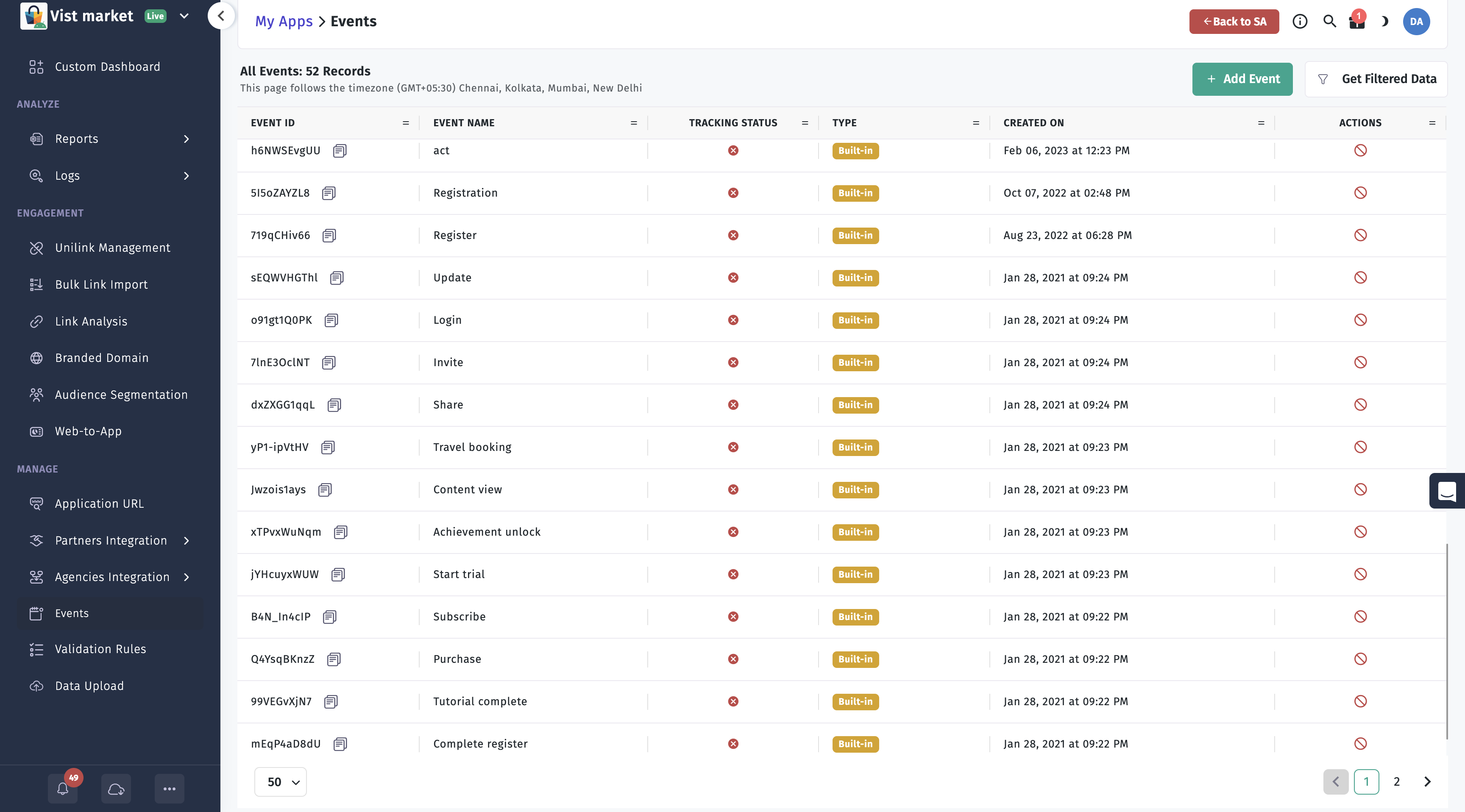
Supported Built-in Events
LOGINUPDATEPURCHASESUBSCRIBESTART_TRIALACHIEVEMENT_UNLOCKEDCONTENT_VIEWTRAVEL_BOOKINGSHAREINVITEADD_TO_CARTADD_TO_WISHLISTCOMPLETE_REGISTRATIONTUTORIAL_COMPLETIONLEVEL_ACHIEVED
In-built Parameters
You can include additional data with events using the following parameters:
param1,param2,param3,param4,param5,param6,param7,param8,param9,param10revenuecurrencyorderIdproductIddiscountcouponCodeev(for custom key-value pairs)
The argument passed to the TrackierEvent class is the event ID (e.g., TrackierEvent.LOGIN for built-in events).
Usage
Create a TrackierEvent instance and trigger it on a user action, such as a button click. Below are examples for tracking a LOGIN event.
Track Event Example
- ✓ Apptrove SDK (Recommended)
- Trackier SDK (Deprecating August 2026)
import { AppTroveConfig, AppTroveSDK, AppTroveEvent } from 'apptrove-expo-sdk';

function trackLoginEvent() {
  // Below are the example of built-in events function calling
  // The arguments - "AppTroveEvent.LOGIN" passed in the AppTrove event class is Events id
  const event = new AppTroveEvent(AppTroveEvent.LOGIN);

  /* Below are the function for the adding the extra data,
     You can add the extra data like login details of user or anything you need.
     We have 10 params to add data, Below 5 are mentioned */
  event.param1 = "Param 1";
  event.param2 = "Param 2";
  event.param3 = "Param 3";
  event.param4 = "Param 4";
  event.param5 = "Param 5";

  // Set additional event properties
  event.orderId = "order123";
  event.discount = 10.0;
  event.couponCode = "SAVE10";

  AppTroveSDK.trackEvent(event);
  console.log("Login event tracked");
}
import { TrackierConfig, TrackierSDK, TrackierEvent } from 'trackier-expo-sdk';

function trackLoginEvent() {
  // Below are the example of built-in events function calling
  // The arguments - "TrackierEvent.LOGIN" passed in the Trackier event class is Events id
  const event = new TrackierEvent(TrackierEvent.LOGIN);

  /* Below are the function for the adding the extra data,
     You can add the extra data like login details of user or anything you need.
     We have 10 params to add data, Below 5 are mentioned */
  event.param1 = "Param 1";
  event.param2 = "Param 2";
  event.param3 = "Param 3";
  event.param4 = "Param 4";
  event.param5 = "Param 5";

  // Set additional event properties
  event.orderId = "order123";
  event.discount = 10.0;
  event.couponCode = "SAVE10";

  TrackierSDK.trackEvent(event);
  console.log("Login event tracked");
}
2. Custom Events
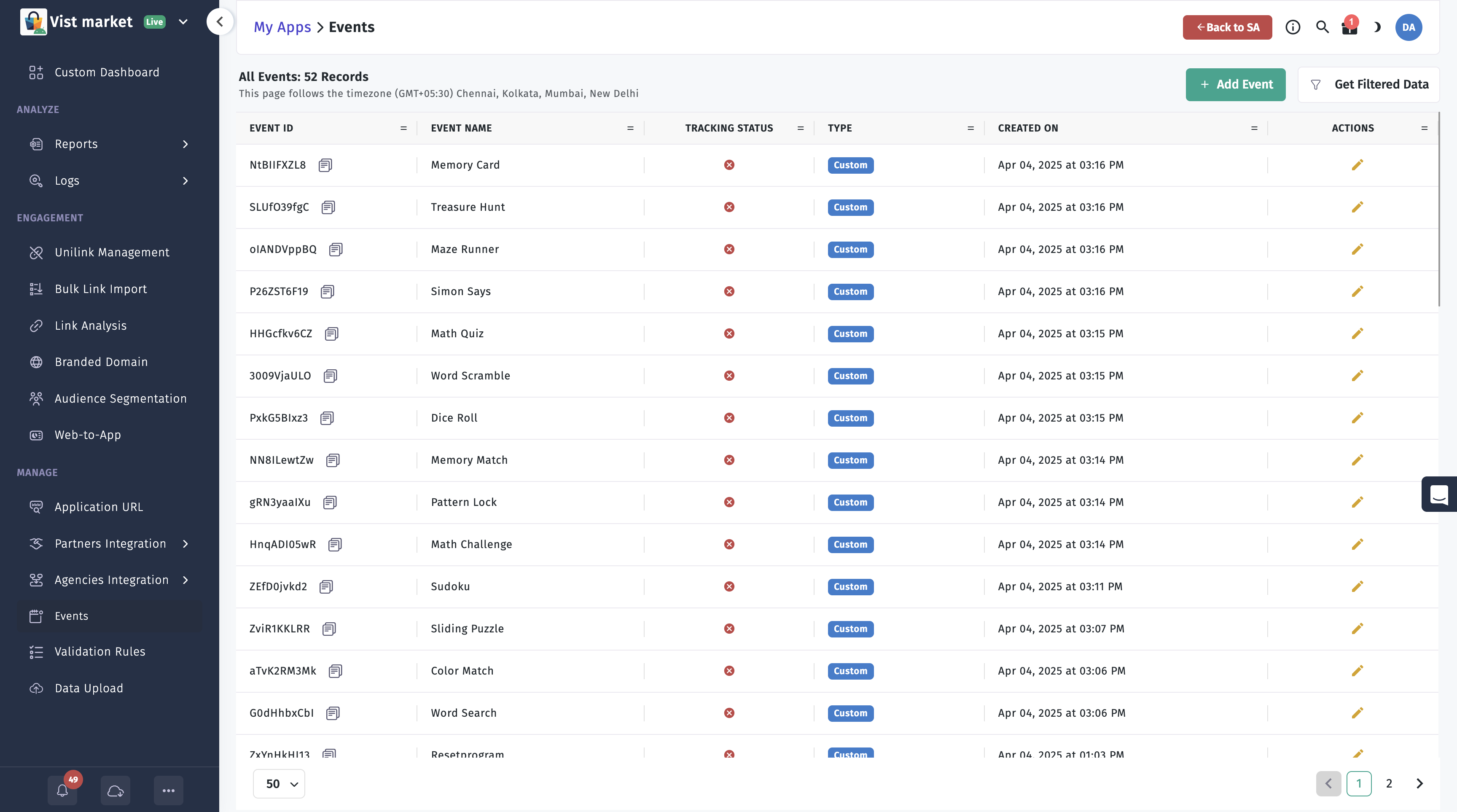
Custom events are defined in the Apptrove Panel and identified by unique event IDs. Use these to track app-specific interactions not covered by built-in events.
Usage
Create a TrackierEvent instance with the custom event ID from the Apptrove Panel and trigger it as needed.
- ✓ Apptrove SDK (Recommended)
- Trackier SDK (Deprecating August 2026)
import { AppTroveConfig, AppTroveSDK, AppTroveEvent } from 'apptrove-expo-sdk';

function trackCustomEvent() {
  // Below are the example of customs events function calling
  // The arguments - "sEMWSCTXeu" passed in the event class is Events id
  const event = new AppTroveEvent("sEMWSCTXeu");

  /* Below are the function for the adding the extra data,
     You can add the extra data like login details of user or anything you need.
     We have 10 params to add data, Below 5 are mentioned */
  event.param1 = "Param 1";
  event.param2 = "Param 2";
  event.param3 = "Param 3";
  event.param4 = "Param 4";
  event.param5 = "Param 5";

  AppTroveSDK.trackEvent(event);
  console.log("Custom event tracked");
}
import { TrackierConfig, TrackierSDK, TrackierEvent } from 'trackier-expo-sdk';

function trackCustomEvent() {
  // Below are the example of customs events function calling
  // The arguments - "sEMWSCTXeu" passed in the event class is Events id
  const event = new TrackierEvent("sEMWSCTXeu");

  /* Below are the function for the adding the extra data,
     You can add the extra data like login details of user or anything you need.
     We have 10 params to add data, Below 5 are mentioned */
  event.param1 = "Param 1";
  event.param2 = "Param 2";
  event.param3 = "Param 3";
  event.param4 = "Param 4";
  event.param5 = "Param 5";

  TrackierSDK.trackEvent(event);
  console.log("Custom event tracked");
}
3. Complete Event Tracking Example
This comprehensive example demonstrates how to track a COMPLETE_REGISTRATION event with all available parameters, user data, and custom attributes.
- ✓ Apptrove SDK (Recommended)
- Trackier SDK (Deprecating August 2026)
import { AppTroveConfig, AppTroveSDK, AppTroveEvent } from 'apptrove-expo-sdk';

function trackCompleteRegistration() {
  // Note: Ensure AppTroveSDK.initialize is called before tracking events.

  // Create event with COMPLETE_REGISTRATION ID

   const event = new AppTroveEvent(AppTroveEvent.COMPLETE_REGISTRATION);

  // Alternatively : const event = new AppTroveEvent("w43424");  // Pass your Event ID

    // Built-in fields
    event.orderId = "REG_001";
    event.currency = "USD";
    event.couponCode = "WELCOME10";
    event.discount = 5.0;
    event.revenue = 0.0; // free signup in this case


    // Custom parameters for structured data
    event.param1 = "Test1";            // String: Dummy value
    event.param2 = "Test2";            // String: Dummy value
    event.param3 = "Test3";            // String: Dummy value
    event.param4 = "Test4";            // String: Dummy value
    event.param5 = "Test5";            // String: Dummy value
    event.param6 = "Test6";            // String: Dummy value
    event.param7 = "Test7";            // String: Dummy value
    event.param8 = "Test8";            // String: Dummy value
    event.param9 = "Test9";            // String: Dummy value
    event.param10 = "Test10";          // String: Dummy value

    // Custom key-value pairs for flexible data

    event.setEventValue("signup_time", 1631234567890); // Number: Timestamp
    event.setEventValue("sdk", "ExpoNative");         // String: Device type

    // Custom data (ev map)
    event.ev = {
      signup_time: Date.now(),
      device: "Expo-ReactNative",
      referral: "Campaign_XYZ",
    };

    //  Attach user details
    AppTroveSDK.setUserId("USER12345");
    AppTroveSDK.setUserEmail("user@example.com");
    AppTroveSDK.setUserName("Jane Doe");
    AppTroveSDK.setUserPhone("+1234567890");
    AppTroveSDK.setIMEI("123456789012345", "987654321098765");
    AppTroveSDK.setMacAddress("00:1A:2B:3C:4D:5E");

    // Additional user details
    var jsonData = {"phone": "+91-8137872378" , "name": "Embassies"};
    AppTroveSDK.setUserAdditionalDetails(jsonData)

    //  Send event
    AppTroveSDK.trackEvent(event);
  }
import { TrackierConfig, TrackierSDK, TrackierEvent } from 'trackier-expo-sdk';

function trackCompleteRegistration() {
  // Note: Ensure TrackierSDK.initialize is called before tracking events.

  // Create event with COMPLETE_REGISTRATION ID

   const event = new TrackierEvent(TrackierEvent.COMPLETE_REGISTRATION);

  // Alternatively : const event = new TrackierEvent("w43424");  // Pass your Event ID

    // Built-in fields
    event.orderId = "REG_001";
    event.currency = "USD";
    event.couponCode = "WELCOME10";
    event.discount = 5.0;
    event.revenue = 0.0; // free signup in this case


    // Custom parameters for structured data
    event.param1 = "Test1";            // String: Dummy value
    event.param2 = "Test2";            // String: Dummy value
    event.param3 = "Test3";            // String: Dummy value
    event.param4 = "Test4";            // String: Dummy value
    event.param5 = "Test5";            // String: Dummy value
    event.param6 = "Test6";            // String: Dummy value
    event.param7 = "Test7";            // String: Dummy value
    event.param8 = "Test8";            // String: Dummy value
    event.param9 = "Test9";            // String: Dummy value
    event.param10 = "Test10";          // String: Dummy value

    // Custom key-value pairs for flexible data

    event.setEventValue("signup_time", 1631234567890); // Number: Timestamp
    event.setEventValue("sdk", "ExpoNative");         // String: Device type

    // Custom data (ev map)
    event.ev = {
      signup_time: Date.now(),
      device: "Expo-ReactNative",
      referral: "Campaign_XYZ",
    };

    //  Attach user details
    TrackierSDK.setUserId("USER12345");
    TrackierSDK.setUserEmail("user@example.com");
    TrackierSDK.setUserName("Jane Doe");
    TrackierSDK.setUserPhone("+1234567890");
    TrackierSDK.setIMEI("123456789012345", "987654321098765");
    TrackierSDK.setMacAddress("00:1A:2B:3C:4D:5E");

    // Additional user details
    var jsonData = {"phone": "+91-8137872378" , "name": "Embassies"};
    TrackierSDK.setUserAdditionalDetails("data", jsonData)

    //  Send event
    TrackierSDK.trackEvent(event);
  }
4. Revenue Events
Revenue events track in-app revenue, including the amount and currency, to monitor app monetization.
Usage
Create a TrackierEvent instance, set the revenue and currency fields, and trigger the event.
- ✓ Apptrove SDK (Recommended)
- Trackier SDK (Deprecating August 2026)
import { AppTroveConfig, AppTroveSDK, AppTroveEvent } from 'apptrove-expo-sdk';

function trackRevenueEvent() {
  // Below are the example of customs events function calling
  // The arguments - "sEMWSCTXeu" passed in the event class is Events id
  const event = new AppTroveEvent("sEMWSCTXeu");

  // Passing the revenue events be like below example
  event.revenue = 2.5; // Pass your generated revenue here.
  event.currency = "USD"; // Pass your currency here.

  AppTroveSDK.trackEvent(event);
  console.log("Revenue event tracked");
}
import { TrackierConfig, TrackierSDK, TrackierEvent } from 'trackier-expo-sdk';

function trackRevenueEvent() {
  // Below are the example of customs events function calling
  // The arguments - "sEMWSCTXeu" passed in the event class is Events id
  const event = new TrackierEvent("sEMWSCTXeu");

  // Passing the revenue events be like below example
  event.revenue = 2.5; // Pass your generated revenue here.
  event.currency = "USD"; // Pass your currency here.

  TrackierSDK.trackEvent(event);
  console.log("Revenue event tracked");
}
5. Custom Parameters in Events
You can pass additional custom parameters using a JavaScript object, which is assigned to the ev field of the TrackierEvent object.
Usage
Create a JavaScript object, add custom parameters, and assign it to the event's ev field before tracking.
- ✓ Apptrove SDK (Recommended)
- Trackier SDK (Deprecating August 2026)
import { AppTroveConfig, AppTroveSDK, AppTroveEvent } from 'apptrove-expo-sdk';

function trackCustomParamsEvent() {
  // Below are the example of customs events function calling
  // The arguments - "sEMWSCTXeu" passed in the event class is Events id
  const event = new AppTroveEvent("sEMWSCTXeu");

  // Passing the extra data through customs params
  const eventCustomParams = {
    customParam1: "xxxxxx",
    customParam2: "xxxxxx"
  };
  event.ev = eventCustomParams; // Pass the reference to the ev

  AppTroveSDK.trackEvent(event);
  console.log("Custom params event tracked");
}
import { TrackierConfig, TrackierSDK, TrackierEvent } from 'trackier-expo-sdk';

function trackCustomParamsEvent() {
  // Below are the example of customs events function calling
  // The arguments - "sEMWSCTXeu" passed in the event class is Events id
  const event = new TrackierEvent("sEMWSCTXeu");

  // Passing the extra data through customs params
  const eventCustomParams = {
    customParam1: "xxxxxx",
    customParam2: "xxxxxx"
  };
  event.ev = eventCustomParams; // Pass the reference to the ev

  TrackierSDK.trackEvent(event);
  console.log("Custom params event tracked");
}
6. Enhanced Event Properties
You can set additional event properties for more detailed tracking:
- ✓ Apptrove SDK (Recommended)
- Trackier SDK (Deprecating August 2026)
import { AppTroveConfig, AppTroveSDK, AppTroveEvent } from 'apptrove-expo-sdk';

function trackEnhancedEvent() {
  const event = new AppTroveEvent(AppTroveEvent.PURCHASE);

  // Set basic event parameters
  event.param1 = "Product Category";
  event.param2 = "Product Brand";
  event.param3 = "Product Model";

  // Set enhanced properties
  event.orderId = "order_12345";
  event.discount = 15.50;
  event.couponCode = "SUMMER2024";
  event.revenue = 99.99;
  event.currency = "USD";

  // Set custom event values using setEventValue method
  event.setEventValue("user_segment", "premium");
  event.setEventValue("purchase_method", "credit_card");
  event.setEventValue("campaign_source", "facebook");

  AppTroveSDK.trackEvent(event);
  console.log("Enhanced event tracked");
}
import { TrackierConfig, TrackierSDK, TrackierEvent } from 'trackier-expo-sdk';

function trackEnhancedEvent() {
  const event = new TrackierEvent(TrackierEvent.PURCHASE);

  // Set basic event parameters
  event.param1 = "Product Category";
  event.param2 = "Product Brand";
  event.param3 = "Product Model";

  // Set enhanced properties
  event.orderId = "order_12345";
  event.discount = 15.50;
  event.couponCode = "SUMMER2024";
  event.revenue = 99.99;
  event.currency = "USD";

  // Set custom event values using setEventValue method
  event.setEventValue("user_segment", "premium");
  event.setEventValue("purchase_method", "credit_card");
  event.setEventValue("campaign_source", "facebook");

  TrackierSDK.trackEvent(event);
  console.log("Enhanced event tracked");
}
You can pass user information along with events to enhance tracking and personalization:
- ✓ Apptrove SDK (Recommended)
- Trackier SDK (Deprecating August 2026)
import { AppTroveConfig, AppTroveSDK, AppTroveEvent } from 'apptrove-expo-sdk';

function trackEventWithUserData() {
  const event = new AppTroveEvent(AppTroveEvent.ADD_TO_CART);

  // Set user information
  AppTroveSDK.setUserId("user123");
  AppTroveSDK.setUserEmail("user@example.com");
  AppTroveSDK.setUserName("John Doe");
  AppTroveSDK.setUserPhone("1234567890");

  // Set additional user details
  const additionalData = {
    age: "25",
    gender: "male",
    location: "New York",
    preferences: ["sports", "technology"]
  };
  AppTroveSDK.setUserAdditionalDetails(additionalData);

  AppTroveSDK.trackEvent(event);
  console.log("Event tracked with user data");
}
import { TrackierConfig, TrackierSDK, TrackierEvent } from 'trackier-expo-sdk';

function trackEventWithUserData() {
  const event = new TrackierEvent(TrackierEvent.ADD_TO_CART);

  // Set user information
  TrackierSDK.setUserId("user123");
  TrackierSDK.setUserEmail("user@example.com");
  TrackierSDK.setUserName("John Doe");
  TrackierSDK.setUserPhone("1234567890");

  // Set additional user details
  const additionalData = {
    age: "25",
    gender: "male",
    location: "New York",
    preferences: ["sports", "technology"]
  };
  TrackierSDK.setUserAdditionalDetails("data", additionalData);

  TrackierSDK.trackEvent(event);
  console.log("Event tracked with user data");
}
Event Parameters
The TrackierEvent object supports various parameters for detailed tracking:
- param1, param2, param3, param4, param5: Custom parameters for event-specific data
- revenue: Revenue amount (for revenue events)
- currency: Currency code (e.g., "USD", "EUR")
- orderId: Order identifier for purchase events
- discount: Discount amount applied to the transaction
- couponCode: Coupon code used in the transaction
- ev: Custom JSON data for additional event information
- setEventValue(key, value): Method to set custom key-value pairs for enhanced tracking
Best Practices
- Consistent Event Names: Use consistent naming conventions for your custom events
- Meaningful Parameters: Include relevant data in event parameters for better analytics
- User Privacy: Ensure you have user consent before tracking personal information
- Error Handling: Wrap event tracking calls in try-catch blocks to handle errors gracefully
- Testing: Test event tracking on both Android and iOS devices
- Documentation: Keep a record of all custom events and their purposes
Next Steps
After implementing event tracking:
- Verify events are appearing in your Apptrove Panel
- Implement advanced features like deep linking and uninstall tracking
- For assistance, contact Apptrove support at support@apptrove.com