Choose your SDK version below:
- Apptrove SDK → Recommended for all projects (Latest: v2.x.x)
- Trackier SDK → Will be deprecated in August 2026 (v1.x.xx)
Use the tabs below to view event tracking code for your chosen SDK.
Overview
This guide provides instructions for tracking user interactions in your iOS application using the Apptrove SDK's TrackierEvent object. Event tracking offers insights into user actions, such as logins, purchases, or custom events.
Prerequisites
- Access to the Trackier Panel for configuring custom events
- iOS 10.0 or later and Xcode 12.0 or later
- Basic knowledge of Swift and iOS development
Event Tracking
Event tracking provides insights into user interactions, such as logins, purchases, or custom actions. The TrackierEvent object is used to structure and send event information to Trackier servers, triggered by user actions like button clicks.
1. Built-in Events
Built-in events are predefined constants available on the Trackier dashboard. You can implement these events directly in your app to track common user interactions.
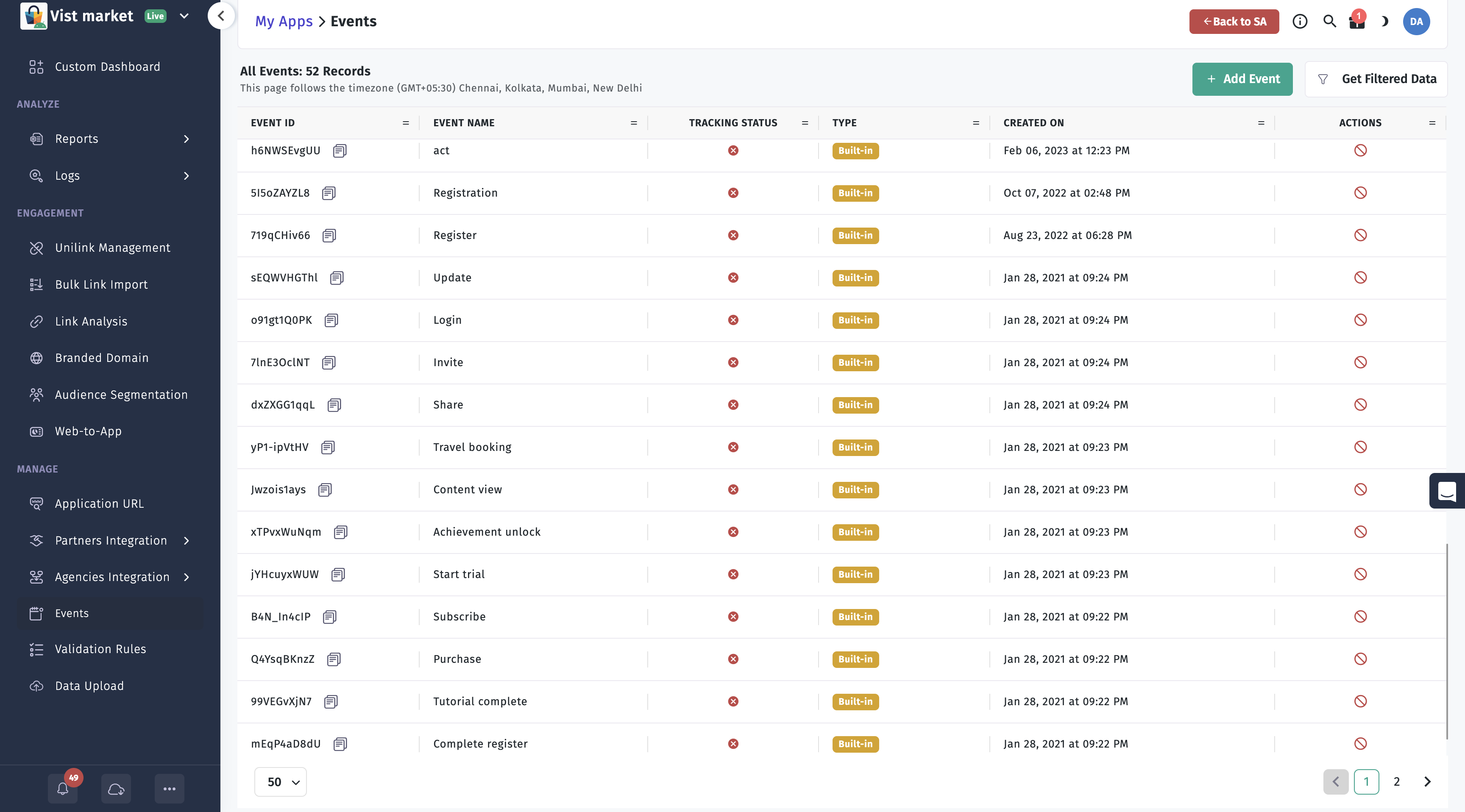
Supported Built-in Events
LOGINREGISTERLOGOUTPURCHASECHECKOUT_STARTEDCHECKOUT_COMPLETEDADD_TO_WISHLISTCONTENT_VIEWVIEW_CARTREMOVE_FROM_CARTSEARCHPRODUCT_VIEWUPDATEINVITESHARESTART_TRIALSUBSCRIBECOMPLETE_REGISTERACHIEVEMENT_UNLOCKTUTORIAL_COMPLETEAPP_OPENTRAVEL_BOOKINGPRODUCT_SEARCHREGISTRATIONADD_TO_CARTLEVEL_ACHIEVED
Available Parameters
You can include additional data with events using the following parameters:
orderIdrevenuecurrencyparam1,param2,param3,param4,param5,param6,param7,param8,param9,param10
Usage
Create a TrackierEvent (or AppTroveEvent) instance with the event ID and trigger it on a user action, such as a button click. Below is an example for tracking a LOGIN event.
- ✓ Apptrove SDK (Recommended)
- Trackier SDK (Deprecating August 2026)
- Swift
- Objective-C
/*
 * Event Tracking
  <------------->
 * The below code is the example to pass a event to the Apptrove SDK.
 * This event requires only 1 Parameter which is the Event ID.
 * Below are the example of built-in events function calling
 * The arguments - "AppTroveEvent.LOGIN" passed in the AppTrove event class is Events id
 */
func eventsTracking() {
    // Import the SDK at the top of your file:
    // import ApptroveSDK // or import apptrove_ios_sdk

    let event = AppTroveEvent(id: AppTroveEvent.LOGIN)

    /* Below are the function for the adding the extra data,
       You can add the extra data like login details of user or anything you need.
       We have 10 params to add data, Below 5 are mentioned */
    event.param1 = "this is a param1 value"
    event.param2 = "this is a param2 value"
    event.param3 = "this is a param3 value"
    event.param4 = "this is a param4 value"
    event.param5 = "this is a param5 value"
    DispatchQueue.global().async {
        sleep(1)
        AppTroveSDK.trackEvent(event: event)
    }
}
/*
 * Event Tracking
  <------------->
 * The below code is the example to pass a event to the Apptrove SDK.
 * This event requires only 1 Parameter which is the Event ID.
 * Below are the example of built-in events function calling
 * The arguments - "AppTroveEvent.LOGIN" passed in the AppTrove event class is Events id
 */
@import apptrove_ios_sdk;

- (void)eventsTracking {
    AppTroveEvent *event = [[AppTroveEvent alloc] initWithId:AppTroveEvent.LOGIN];

    /* Below are the function for the adding the extra data,
       You can add the extra data like login details of user or anything you need.
       We have 10 params to add data, Below 5 are mentioned */
    event.param1 = @"this is a param1 value";
    event.param2 = @"this is a param2 value";
    event.param3 = @"this is a param3 value";
    event.param4 = @"this is a param4 value";
    event.param5 = @"this is a param5 value";

    dispatch_async(dispatch_get_global_queue(DISPATCH_QUEUE_PRIORITY_DEFAULT, 0), ^{
        sleep(1);
        [AppTroveSDK trackEventWithEvent:event];
    });
}
/*
 * Event Tracking
  <------------->
 * The below code is the example to pass a event to the Apptrove SDK.
 * This event requires only 1 Parameter which is the Event ID.
 * Below are the example of built-in events function calling
 * The arguments - "TrackierEvent.LOGIN" passed in the Trackier event class is Events id
 */
func eventsTracking() {
    // Import the SDK at the top of your file:
    // import TrackierSDK // or import trackier_ios_sdk

    let event = TrackierEvent(id: TrackierEvent.LOGIN)

    /* Below are the function for the adding the extra data,
       You can add the extra data like login details of user or anything you need.
       We have 10 params to add data, Below 5 are mentioned */
    event.param1 = "this is a param1 value"
    event.param2 = "this is a param2 value"
    event.param3 = "this is a param3 value"
    event.param4 = "this is a param4 value"
    event.param5 = "this is a param5 value"
    DispatchQueue.global().async {
        sleep(1)
        TrackierSDK.trackEvent(event: event)
    }
}
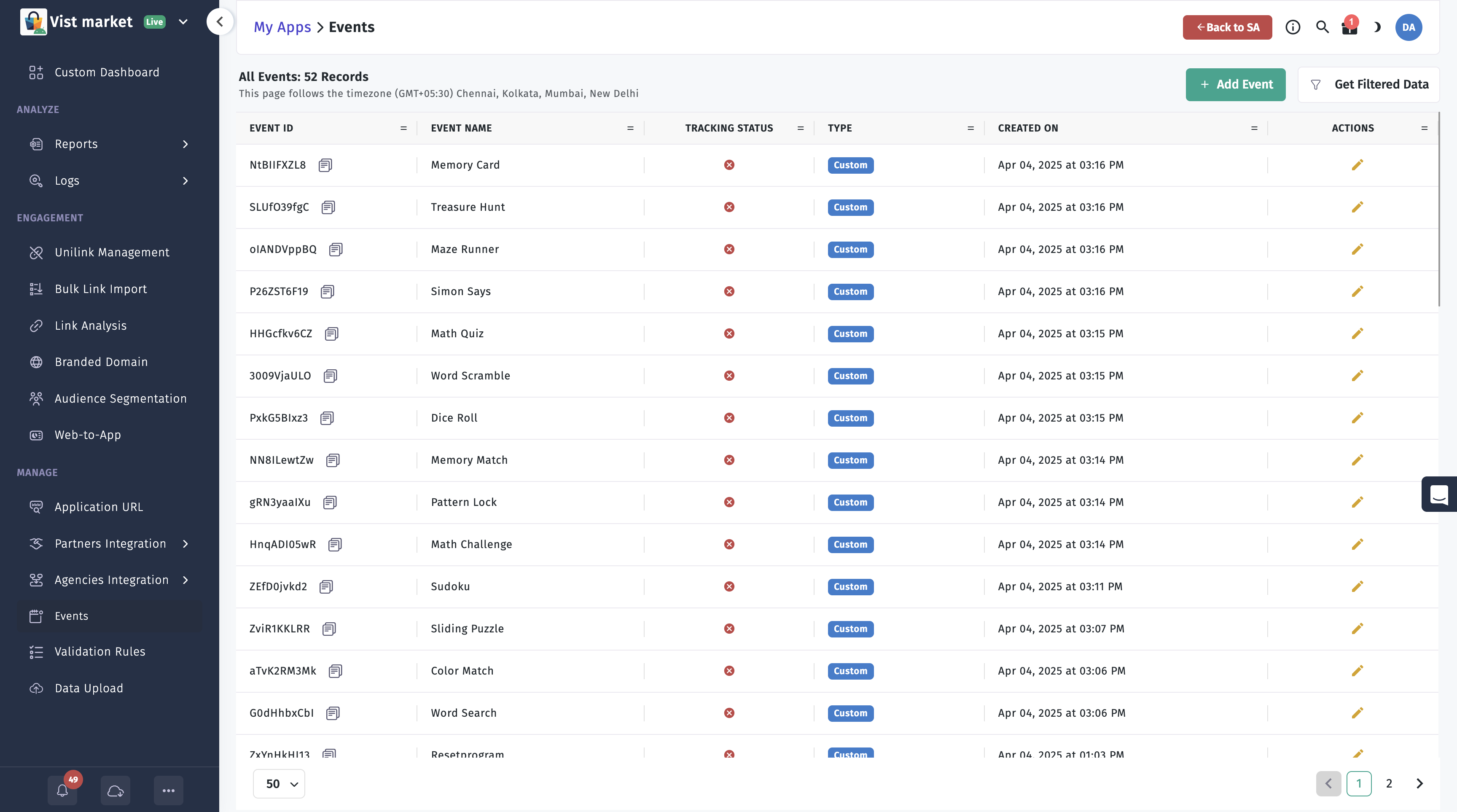
2. Custom Events
Custom events are defined in the Trackier dashboard and identified by unique event IDs. Use these to track app-specific interactions not covered by built-in events.
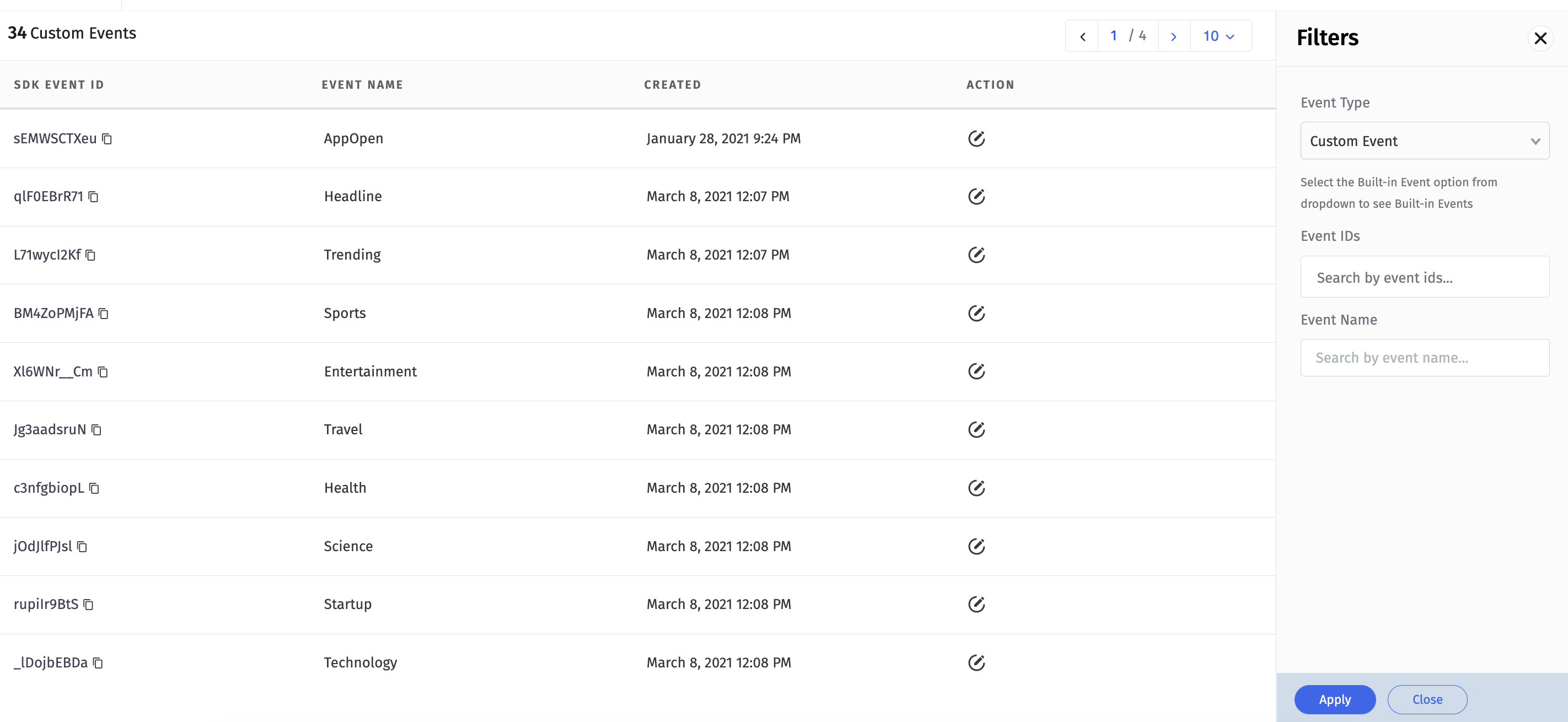
Usage
Create a TrackierEvent (or AppTroveEvent) instance with the custom event ID from the Trackier dashboard and trigger it as needed.
- ✓ Apptrove SDK (Recommended)
- Trackier SDK (Deprecating August 2026)
- Swift
- Objective-C
/*
 * Event Tracking
  <------------->
 * The below code is the example to pass a event to the Apptrove SDK.
 * This event requires only 1 Parameter which is the Event ID.
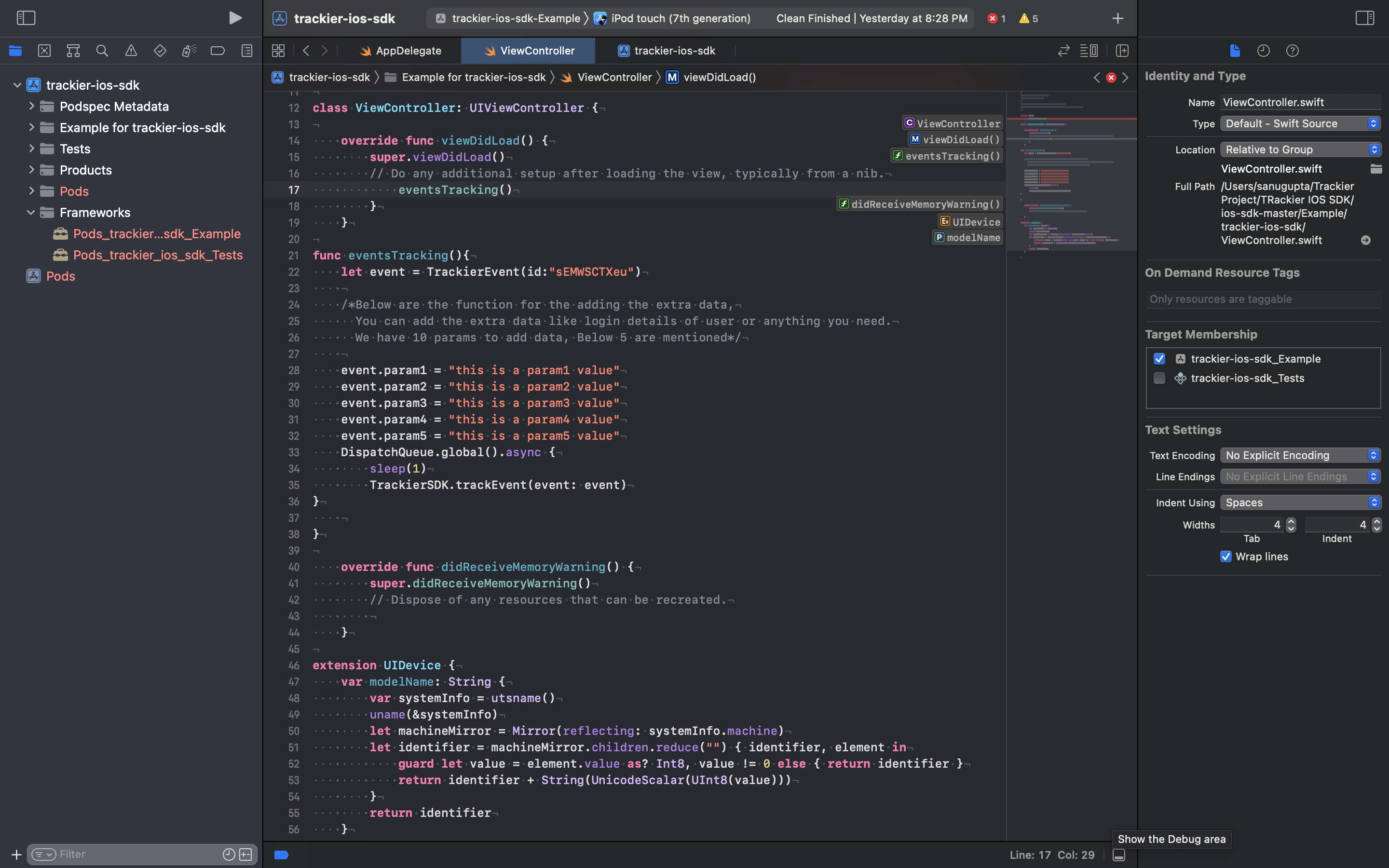
 * Below are the example of customs events function calling for `AppOpen` event name.
 * The arguments - "sEMWSCTXeu" passed in the AppTrove event class is Events id
 */
func eventsTracking() {
    // Import the SDK at the top of your file:
    // import ApptroveSDK // or import apptrove_ios_sdk

    let event = AppTroveEvent(id: "sEMWSCTXeu")

    /* Below are the function for the adding the extra data,
       You can add the extra data like login details of user or anything you need.
       We have 10 params to add data, Below 5 are mentioned */
    event.param1 = "this is a param1 value"
    event.param2 = "this is a param2 value"
    event.param3 = "this is a param3 value"
    event.param4 = "this is a param4 value"
    event.param5 = "this is a param5 value"
    DispatchQueue.global().async {
        sleep(1)
        AppTroveSDK.trackEvent(event: event)
    }
}
/*
 * Event Tracking
  <------------->
 * The below code is the example to pass a event to the Apptrove SDK.
 * This event requires only 1 Parameter which is the Event ID.
 * Below are the example of customs events function calling for `AppOpen` event name.
 * The arguments - "sEMWSCTXeu" passed in the AppTrove event class is Events id
 */
@import apptrove_ios_sdk;

- (void)eventsTracking {
    AppTroveEvent *event = [[AppTroveEvent alloc] initWithId:@"sEMWSCTXeu"];

    /* Below are the function for the adding the extra data,
       You can add the extra data like login details of user or anything you need.
       We have 10 params to add data, Below 5 are mentioned */
    event.param1 = @"this is a param1 value";
    event.param2 = @"this is a param2 value";
    event.param3 = @"this is a param3 value";
    event.param4 = @"this is a param4 value";
    event.param5 = @"this is a param5 value";

    dispatch_async(dispatch_get_global_queue(DISPATCH_QUEUE_PRIORITY_DEFAULT, 0), ^{
        sleep(1);
        [AppTroveSDK trackEventWithEvent:event];
    });
}
/*
 * Event Tracking
  <------------->
 * The below code is the example to pass a event to the Apptrove SDK.
 * This event requires only 1 Parameter which is the Event ID.
 * Below are the example of customs events function calling for `AppOpen` event name.
 * The arguments - "sEMWSCTXeu" passed in the Trackier event class is Events id
 */
func eventsTracking() {
    // Import the SDK at the top of your file:
    // import TrackierSDK // or import trackier_ios_sdk

    let event = TrackierEvent(id: "sEMWSCTXeu")

    /* Below are the function for the adding the extra data,
       You can add the extra data like login details of user or anything you need.
       We have 10 params to add data, Below 5 are mentioned */
    event.param1 = "this is a param1 value"
    event.param2 = "this is a param2 value"
    event.param3 = "this is a param3 value"
    event.param4 = "this is a param4 value"
    event.param5 = "this is a param5 value"
    DispatchQueue.global().async {
        sleep(1)
        TrackierSDK.trackEvent(event: event)
    }
}
3. Complete Event Tracking Example
This comprehensive example demonstrates how to track a COMPLETE_REGISTRATION event with all available parameters, user data, and custom attributes.
- ✓ Apptrove SDK (Recommended)
- Trackier SDK (Deprecating August 2026)
- Swift
- Objective-C
import Foundation
import ApptroveSDK // or import apptrove_ios_sdk

func trackCompleteRegistration() {

    // Create event with COMPLETE_REGISTRATION ID (String) or Custom Event ID
    let event = AppTroveEvent(id: AppTroveEvent.COMPLETE_REGISTRATION)
    // Alternatively: let event = AppTroveEvent(id: "w43424") // Pass your Event ID

    // Built-in fields for event tracking
    event.orderId = "REG_001"          // String?: Unique registration ID
    event.setCouponCode(couponCode: "343434234") // String?: Coupon code used
    event.setDiscount(discount: 3.1415) // Float64?: Discount applied (or nil)
    event.setRevenue(revenue: 0.0, currency: "USD") // Float64?, String?: No revenue (free signup)

    // Custom parameters for structured data
    // Data type: String? - You can add any string value here
    event.param1 = "Test1"     // String?: Dummy value
    event.param2 = "Test2"     // String?: Dummy value
    event.param3 = "Test3"     // String?: Dummy value
    event.param4 = "Test4"     // String?: Dummy value
    event.param5 = "Test5"     // String?: Dummy value
    event.param6 = "Test6"     // String?: Dummy value
    event.param7 = "Test7"     // String?: Dummy value
    event.param8 = "Test8"     // String?: Dummy value
    event.param9 = "Test9"     // String?: Dummy value
    event.param10 = "Test10"   // String?: Dummy value

    // Custom key-value pairs for flexible data (Dictionary<String, Any>)
    event.addEventValue(prop: "signup_time", val: 1631234567890) // Int64: Timestamp
    event.addEventValue(prop: "device", val: "iOS")              // String: Device type


    // Set user details in AppTrove SDK
    AppTroveSDK.setUserID(userId: "USER123")              // String: User ID
    AppTroveSDK.setUserEmail(userEmail: "user@example.com") // String: User email
    AppTroveSDK.setUserName(userName: "Jane Doe")         // String: User name
    AppTroveSDK.setUserPhone(userPhone: "+1234567890")    // String: User phone
    AppTroveSDK.setDOB(dob: "1990-01-01")                 // String: Date of birth (YYYY-MM-DD)
    AppTroveSDK.setGender(gender: .MALE)                  // Gender: MALE, FEMALE, or OTHERS
    AppTroveSDK.setDeviceToken(deviceToken: "2342344234")   // String Set Device Token


    // Additional user details (Dictionary<String, Any>)
    let userDetails: [String: Any] = [
        "Plan": "FREE_PLAN",
        "SignupMethod": "Email",
        "AppVersion": "1.0.0"
    ]

    AppTroveSDK.setUserAdditionalDetails(userAdditionalDetails: userDetails)

    // Send the event to AppTrove
    DispatchQueue.global().async {
        sleep(1)
        AppTroveSDK.trackEvent(event: event)
    }
}
@import apptrove_ios_sdk;

- (void)trackCompleteRegistration {
    // Create event with COMPLETE_REGISTRATION ID (String) or Custom Event ID
    AppTroveEvent *event = [[AppTroveEvent alloc] initWithId:AppTroveEvent.COMPLETE_REGISTRATION];
    // Alternatively: AppTroveEvent *event = [[AppTroveEvent alloc] initWithId:@"w43424"];

    // Built-in fields for event tracking
    event.orderId = @"REG_001";          // Unique registration ID
    [event setCouponCodeWithCouponCode:@"343434234"]; // Coupon code used
    [event setDiscountWithDiscount:3.1415]; // Discount applied
    [event setRevenueWithRevenue:0.0 currency:@"USD"]; // No revenue (free signup)

    // Custom parameters for structured data (param1–param10)
    event.param1 = @"Test1";
    event.param2 = @"Test2";
    event.param3 = @"Test3";
    event.param4 = @"Test4";
    event.param5 = @"Test5";
    event.param6 = @"Test6";
    event.param7 = @"Test7";
    event.param8 = @"Test8";
    event.param9 = @"Test9";
    event.param10 = @"Test10";

    // Custom key-value pairs for flexible data
    [event addEventValueWithProp:@"signup_time" numberValue:@(1631234567890)]; // Timestamp
    [event addEventValueWithProp:@"device" stringValue:@"iOS"];              // Device type

    // Set user details in AppTrove SDK
    [AppTroveSDK setUserIDWithUserId:@"USER123"];
    [AppTroveSDK setUserEmailWithUserEmail:@"user@example.com"];
    [AppTroveSDK setUserNameWithUserName:@"Jane Doe"];
    [AppTroveSDK setUserPhoneWithUserPhone:@"+1234567890"];
    [AppTroveSDK setDOBWithDob:@"1990-01-01"]; // YYYY-MM-DD
    [AppTroveSDK setGenderWithGender:AppTroveSDKGenderMALE]; // MALE, FEMALE, or OTHERS
    [AppTroveSDK setDeviceTokenWithDeviceToken:@"2342344234"];

    // Additional user details
    NSDictionary *userDetails = @{
        @"Plan": @"FREE_PLAN",
        @"SignupMethod": @"Email",
        @"AppVersion": @"1.0.0"
    };
    [AppTroveSDK setUserAdditionalDetailsWithUserAdditionalDetails:userDetails];

    // Send the event to AppTrove
    dispatch_async(dispatch_get_global_queue(DISPATCH_QUEUE_PRIORITY_DEFAULT, 0), ^{
        sleep(1);
        [AppTroveSDK trackEventWithEvent:event];
    });
}
import Foundation
import TrackierSDK // or import trackier_ios_sdk

func trackCompleteRegistration() {

    // Create event with COMPLETE_REGISTRATION ID (String) or Custom Event ID
    let event = TrackierEvent(id: TrackierEvent.COMPLETE_REGISTRATION)
    // Alternatively: let event = TrackierEvent(id: "w43424") // Pass your Event ID

    // Built-in fields for event tracking
    event.orderId = "REG_001"          // String?: Unique registration ID
    event.setCouponCode(couponCode: "343434234") // String?: Coupon code used
    event.setDiscount(discount: 3.1415) // Float64?: Discount applied (or nil)
    event.setRevenue(revenue: 0.0, currency: "USD") // Float64?, String?: No revenue (free signup)

    // Custom parameters for structured data
    // Data type: String? - You can add any string value here
    event.param1 = "Test1"     // String?: Dummy value
    event.param2 = "Test2"     // String?: Dummy value
    event.param3 = "Test3"     // String?: Dummy value
    event.param4 = "Test4"     // String?: Dummy value
    event.param5 = "Test5"     // String?: Dummy value
    event.param6 = "Test6"     // String?: Dummy value
    event.param7 = "Test7"     // String?: Dummy value
    event.param8 = "Test8"     // String?: Dummy value
    event.param9 = "Test9"     // String?: Dummy value
    event.param10 = "Test10"   // String?: Dummy value

    // Custom key-value pairs for flexible data (Dictionary<String, Any>)
    event.addEventValue(prop: "signup_time", val: 1631234567890) // Int64: Timestamp
    event.addEventValue(prop: "device", val: "iOS")              // String: Device type


    // Set user details in Trackier SDK
    TrackierSDK.setUserID(userId: "USER123")              // String: User ID
    TrackierSDK.setUserEmail(userEmail: "user@example.com") // String: User email
    TrackierSDK.setUserName(userName: "Jane Doe")         // String: User name
    TrackierSDK.setUserPhone(userPhone: "+1234567890")    // String: User phone
    TrackierSDK.setDOB(dob: "1990-01-01")                 // String: Date of birth (YYYY-MM-DD)
    TrackierSDK.setGender(gender: .MALE)                  // Gender: MALE, FEMALE, or OTHERS
    TrackierSDK.setDeviceToken(deviceToken: "2342344234")   // String Set Device Token


    // Additional user details (Dictionary<String, Any>)
    let userDetails: [String: Any] = [
        "Plan": "FREE_PLAN",
        "SignupMethod": "Email",
        "AppVersion": "1.0.0"
    ]

    TrackierSDK.setUserAdditionalDetails(userAdditionalDetails: userDetails)

    // Send the event to Trackier
    DispatchQueue.global().async {
        sleep(1)
        TrackierSDK.trackEvent(event: event)
    }
}
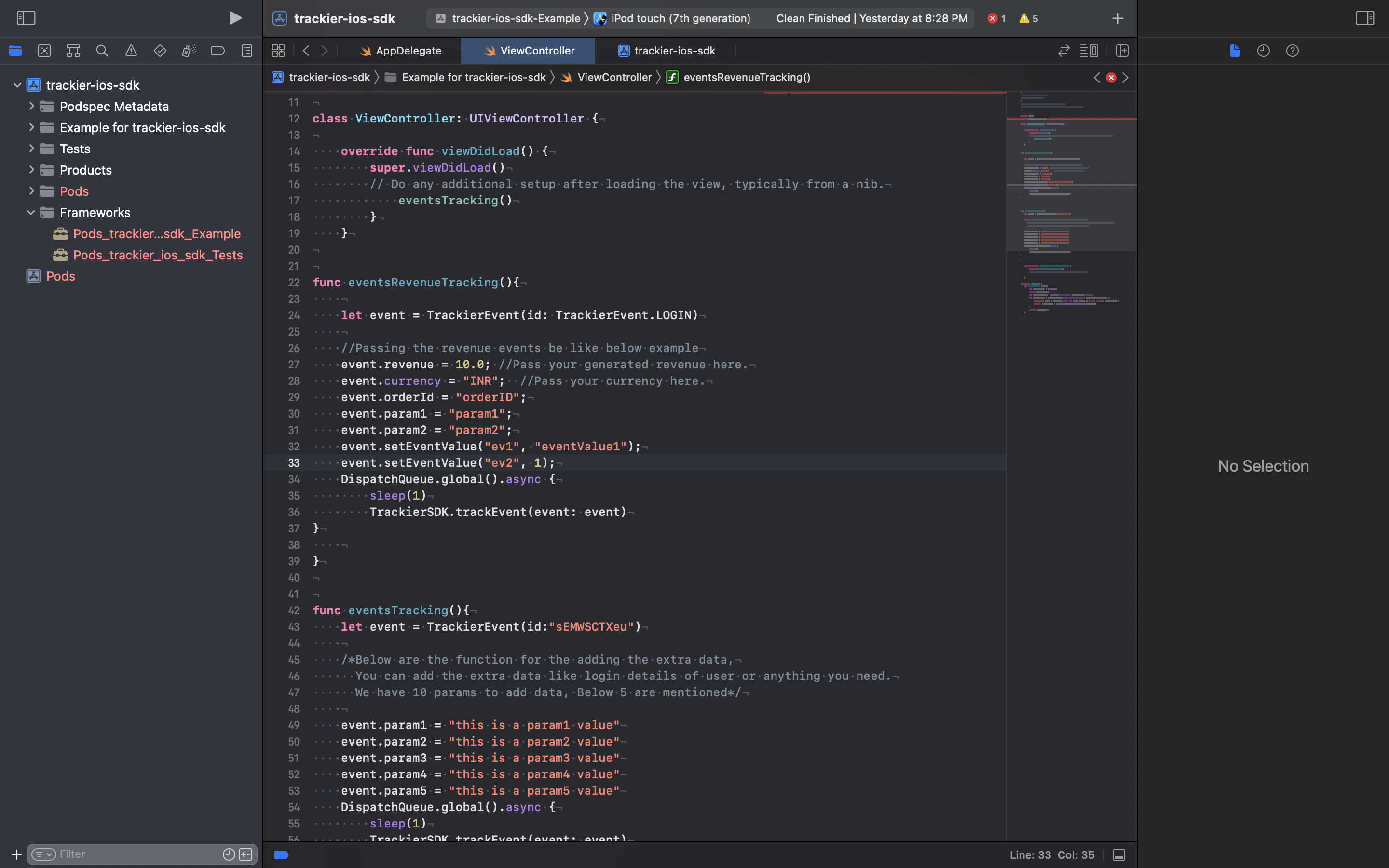
4. Revenue Events
Revenue events track in-app revenue, including the amount, currency, and order ID, to monitor app monetization. Use these for actions like purchases, subscription activations, or in-app purchase completions.
Usage
Create a TrackierEvent (or AppTroveEvent) instance, set the revenue, currency, and other relevant fields, and trigger the event.
- ✓ Apptrove SDK (Recommended)
- Trackier SDK (Deprecating August 2026)
- Swift
- Objective-C
func eventsRevenueTracking() {
    // Import the SDK at the top of your file:
    // import ApptroveSDK // or import apptrove_ios_sdk

    let event = AppTroveEvent(id: AppTroveEvent.LOGIN)

    // Passing the revenue events be like below example
    event.revenue = 10.0 // Pass your generated revenue here
    event.currency = "INR" // Pass your currency here
    event.orderId = "orderID"
    event.param1 = "param1"
    event.param2 = "param2"
    event.setEventValue("ev1", "eventValue1")
    event.setEventValue("ev2", 1)
    DispatchQueue.global().async {
        sleep(1)
        AppTroveSDK.trackEvent(event: event)
    }
}
@import apptrove_ios_sdk;

- (void)eventsRevenueTracking {
    AppTroveEvent *event = [[AppTroveEvent alloc] initWithId:AppTroveEvent.LOGIN];

    // Passing the revenue events be like below example
    event.revenue = 10.0;      // Pass your generated revenue here
    event.currency = @"INR";   // Pass your currency here
    event.orderId = @"orderID";
    event.param1 = @"param1";
    event.param2 = @"param2";
    [event addEventValueWithProp:@"ev1" stringValue:@"eventValue1"];
    [event addEventValueWithProp:@"ev2" numberValue:@(1)];

    dispatch_async(dispatch_get_global_queue(DISPATCH_QUEUE_PRIORITY_DEFAULT, 0), ^{
        sleep(1);
        [AppTroveSDK trackEventWithEvent:event];
    });
}
func eventsRevenueTracking() {
    // Import the SDK at the top of your file:
    // import TrackierSDK // or import trackier_ios_sdk

    let event = TrackierEvent(id: TrackierEvent.LOGIN)

    // Passing the revenue events be like below example
    event.revenue = 10.0 // Pass your generated revenue here
    event.currency = "INR" // Pass your currency here
    event.orderId = "orderID"
    event.param1 = "param1"
    event.param2 = "param2"
    event.setEventValue("ev1", "eventValue1")
    event.setEventValue("ev2", 1)
    DispatchQueue.global().async {
        sleep(1)
        TrackierSDK.trackEvent(event: event)
    }
}
5. Custom Parameters
Add custom key-value pairs to events for additional context, such as user details or event-specific metadata.
Usage
Create a TrackierEvent (or AppTroveEvent) instance, set user details using TrackierSDK (or AppTroveSDK) methods, and add custom event values before tracking.
- ✓ Apptrove SDK (Recommended)
- Trackier SDK (Deprecating August 2026)
- Swift
- Objective-C
func userDetails() {
    // Import the SDK at the top of your file:
    // import ApptroveSDK // or import apptrove_ios_sdk

    let event = AppTroveEvent(id: AppTroveEvent.LOGIN)

    /* Passing the UserId and User EmailId Data */
    AppTroveSDK.setUserId("XXXXXXXX") // Pass user Id here
    AppTroveSDK.setUserEmail("abc@gmail.com") // Pass email Id
    AppTroveSDK.setUserName(userName: "abc") // Pass User Name
    AppTroveSDK.setUserPhone(userPhone: "8138933891") // Pass User Phone Number

    /* Passing the custom value in the events */
    event.addEventValue("customeValue1", "XXXXX")
    event.addEventValue("customeValue2", "XXXXX")

    DispatchQueue.global().async {
        sleep(1)
        AppTroveSDK.trackEvent(event: event)
    }
}
@import apptrove_ios_sdk;

- (void)userDetails {
    AppTroveEvent *event = [[AppTroveEvent alloc] initWithId:AppTroveEvent.LOGIN];

    /* Passing the UserId and User EmailId Data */
    [AppTroveSDK setUserIDWithUserId:@"XXXXXXXX"]; // Pass user Id here
    [AppTroveSDK setUserEmailWithUserEmail:@"abc@gmail.com"]; // Pass email Id
    [AppTroveSDK setUserNameWithUserName:@"abc"]; // Pass User Name
    [AppTroveSDK setUserPhoneWithUserPhone:@"8138933891"]; // Pass User Phone Number

    /* Passing the custom value in the events */
    [event addEventValueWithProp:@"customeValue1" stringValue:@"XXXXX"];
    [event addEventValueWithProp:@"customeValue2" stringValue:@"XXXXX"];

    dispatch_async(dispatch_get_global_queue(DISPATCH_QUEUE_PRIORITY_DEFAULT, 0), ^{
        sleep(1);
        [AppTroveSDK trackEventWithEvent:event];
    });
}
func userDetails() {
    // Import the SDK at the top of your file:
    // import TrackierSDK // or import trackier_ios_sdk

    let event = TrackierEvent(id: TrackierEvent.LOGIN)

    /* Passing the UserId and User EmailId Data */
    TrackierSDK.setUserId("XXXXXXXX") // Pass user Id here
    TrackierSDK.setUserEmail("abc@gmail.com") // Pass email Id
    TrackierSDK.setUserName(userName: "abc") // Pass User Name
    TrackierSDK.setUserPhone(userPhone: "8138933891") // Pass User Phone Number

    /* Passing the custom value in the events */
    event.addEventValue("customeValue1", "XXXXX")
    event.addEventValue("customeValue2", "XXXXX")

    DispatchQueue.global().async {
        sleep(1)
        TrackierSDK.trackEvent(event: event)
    }
}
Best Practices
- Use built-in events for standard interactions to simplify integration.
- Define custom events in the Trackier dashboard for app-specific actions.
- Include relevant parameters (e.g.,
revenue,currency,orderId) for revenue events to ensure accurate monetization tracking. - Test events in
ENV_TESTINGorENV_DEVELOPMENTmode before switching toENVIRONMENT_PRODUCTION. - Use meaningful parameter names for custom parameters to improve reporting clarity.
- Trigger events asynchronously (e.g., using
DispatchQueue.global().async) to avoid blocking the main thread.
Troubleshooting
- Events Not Tracking: Verify the SDK is initialized and the correct event ID is used.
- Invalid Parameters: Ensure parameter names match those defined in the Trackier dashboard.
- Revenue Issues: Confirm the
revenue,currency, andorderIdfields are set correctly. - User Details Not Recorded: Check that user detail methods (e.g.,
setUserId) are called before tracking events.
For further assistance, refer to the Apptrove Documentation Portal or contact Apptrove support at support@apptrove.com. .