Through Firebase Analytics
SDK Version Selection
Choose your SDK version below:
- Apptrove SDK → Recommended for all projects (Latest: v2.x.x)
- Trackier SDK → Will be deprecated in August 2026 (v1.x.xx)
Use the tabs below to view uninstall tracking code for your chosen SDK.
Uninstall tracking through Firebase Analytics helps you understand user behavior and optimize campaigns:
- Purpose: Tracks app uninstalls to assess user engagement and campaign performance.
- Mechanism: Uses Firebase Analytics to set a user property (
ct_objectId) linked to unique identifier, and captures theapp_removeevent. - Workflow:
- Set
ct_objectIdwithSDK.getAppTroveId()orSDK.getTrackierId()in your app. - Configure
app_removeas a conversion event in Firebase. - Use a Firebase Cloud Function to send uninstall data to MMP.
- Set
- Use Case: Measure uninstall rates for a campaign to refine targeting.
Alternative Method
For FCM-based uninstall tracking, see FCM.
Implementation
1. Add Dependencies
dependencies {
    implementation platform('com.google.firebase:firebase-bom:33.1.0')
    implementation 'com.google.firebase:firebase-analytics'
}
2. Set User Property
- ✓ Apptrove SDK (Recommended)
- Trackier SDK (Deprecating August 2026)
- Java
- Kotlin
private FirebaseAnalytics mFirebaseAnalytics;

// Initialize Firebase Analytics
FirebaseAnalytics mFirebaseAnalytics = FirebaseAnalytics.getInstance(this);

// Set the user property with SDK ID
mFirebaseAnalytics.setUserProperty("ct_objectId", Objects.requireNonNull(AppTroveSDK.getAppTroveId()));
private lateinit var firebaseAnalytics: FirebaseAnalytics

// Initialize Firebase Analytics
firebaseAnalytics = FirebaseAnalytics.getInstance(this)

// Set the user property with SDK ID
firebaseAnalytics.setUserProperty("ct_objectId", AppTroveSDK.getAppTroveId() ?: "unknown")
- Java
- Kotlin
private FirebaseAnalytics mFirebaseAnalytics;

// Initialize Firebase Analytics
FirebaseAnalytics mFirebaseAnalytics = FirebaseAnalytics.getInstance(this);

// Set the user property with Trackier ID
mFirebaseAnalytics.setUserProperty("ct_objectId", Objects.requireNonNull(TrackierSDK.getTrackierId()));
private lateinit var firebaseAnalytics: FirebaseAnalytics

// Initialize Firebase Analytics
firebaseAnalytics = FirebaseAnalytics.getInstance(this)

// Set the user property with Trackier ID
firebaseAnalytics.setUserProperty("ct_objectId", TrackierSDK.getTrackierId() ?: "unknown")
3. Setup Cloud Functions
Prerequisites
- Node.js 20.x or 22.x (use nvm for easy version management)
- Firebase CLI (
npm install -g firebase-tools) - Firebase project on Blaze plan (required for analytics triggers)
- Google account with access to Firebase Console
- App with Firebase Analytics SDK integrated
- Trackier account (for uninstall event tracking)
Set Up Node.js and Firebase CLI
# Install Node Version Manager (nvm) if not already installed
curl -o- https://raw.githubusercontent.com/nvm-sh/nvm/v0.39.7/install.sh | bash

# Install and use Node.js 22 (recommended)
nvm install 22
nvm use 22

# Install Firebase CLI globally
npm install -g firebase-tools

# Login to Firebase
firebase login
Create or Select Your Firebase Project
If you already have a Firebase project for your app:
- Go to Firebase Console
- Select your project
If you need to create a new Firebase project:
- In the Firebase Console, click Add project and follow the steps
- Link Google Analytics when prompted
- Register your Android app and download
google-services.jsonfor your app
Initialize Firebase Functions in Your Project Directory
# Create a new directory for your project (if needed)
mkdir YourProjectName
cd YourProjectName

# Initialize Firebase in this directory
firebase init functions
- Choose:
- Use an existing project (if you already have one) or create a new one
- Language: JavaScript
- ESLint: Yes (recommended)
- Install dependencies: Yes
Prepare Your Functions Directory
- Your folder structure should look like this:
YourProjectName/
  functions/
    index.js
    package.json
    .eslintrc.js
... - If you already have a
functionsdirectory, use it.
Add the Uninstall Tracking Function Code
Replace the contents of functions/index.js with:
const functions = require("firebase-functions");
const admin = require("firebase-admin");
const axios = require("axios");

// Set your SDK key here (or use environment variables for security)
const SDK_KEY = "YOUR_SDK_KEY_HERE";

admin.initializeApp();

// Defensive: Only export analytics trigger if available
if (!functions.analytics) {
  // This will prevent deployment errors in unsupported environments
  console.warn("Analytics triggers are not available in this environment.");
  exports.sendAndroidUninstallToTrackierApptrove = () => {};
} else {
  exports.sendAndroidUninstallToTrackierApptrove = functions.analytics
      .event("app_remove")
      .onLog(async (event) => {
      // Defensive extraction of user properties
        const userProps =
        event.user && event.user.userProperties ?
          event.user.userProperties :
          {};
        const installId =
        userProps.ct_objectId && userProps.ct_objectId.value ?
          userProps.ct_objectId.value :
          "";
        const mode =
        userProps.ct_mode && userProps.ct_mode.value ?
          userProps.ct_mode.value :
          "production";
        const cuid =
        userProps.ct_uid && userProps.ct_uid.value ?
          userProps.ct_uid.value :
          "";
        const cmail =
        userProps.ct_mail && userProps.ct_mail.value ?
          userProps.ct_mail.value :
          "";

        if (!installId) {
          functions.logger.warn(
              "No ct_objectId found in event",
              {userProps},
          );
          return null;
        }

        const url = "https://events.trackier.io/v1/uninstall";
        const data = {
          installId,
          sdkKey: SDK_KEY,
          mode,
          cuid,
          cmail,
          meta: event,
        };

        try {
          const response = await axios.post(
              url,
              data,
              {
                headers: {"Content-Type": "application/json"},
                timeout: 10000,
              },
          );
          functions.logger.log(
              "Tracked uninstall",
              {
                installId,
                status: response.status,
                data: response.data,
              },
          );
        } catch (error) {
          functions.logger.error(
              "Uninstall tracking failed",
              {
                installId,
                status: error.response ? error.response.status : "N/A",
                data: error.response ? error.response.data : error.message,
              },
          );
        }
        return null;
      });
}
Set Up Dependencies In package.json
{
  "name": "functions",
  "description": "Cloud Functions for Firebase",
  "scripts": {
    "lint:fix": "eslint . --fix",
    "lint": "eslint .",
    "serve": "firebase emulators:start --only functions",
    "shell": "firebase functions:shell",
    "start": "npm run shell",
    "deploy": "firebase deploy --only functions",
    "logs": "firebase functions:log"
  },
  "engines": {
    "node": "20"
  },
  "main": "index.js",
  "dependencies": {
    "axios": "^1.10.0",
    "firebase-admin": "^11.0.0",
    "firebase-functions": "^3.23.0"
  },
  "devDependencies": {
    "eslint": "^8.15.0",
    "eslint-config-google": "^0.14.0"
  },
  "private": true
}
ESLint Configuration
Create a .eslintrc.js file in your functions directory:
// .eslintrc.js
module.exports = {
  parserOptions: {
    ecmaVersion: 2020, // or at least 2015
    sourceType: 'module', // if you're using ES modules (import/export)
  },
  env: {
    es6: true,
    node: true, // if you're in a Node.js environment
  },
};
Deploy Your Function And Fix link Error
# In the functions directory
cd functions

# Install dependencies
npm install

# (Optional) Run linter and auto-fix issues
npm run lint:fix

firebase deploy --only functions
- If you see errors about CPU/Gen 2 or function already existing as 2nd Gen:
firebase functions:delete sendAndroidUninstallToTrackierApptrove --force

// After delete your function redeploy the function

firebase deploy --only functions - Ignore warnings about outdated
firebase-functionsif you need analytics triggers.
Verify and Debug
A. See Data in Firebase Console
- Go to Firebase Console
- Select your project
- Navigate to Analytics > Dashboard and look for the
app_removeevent
B. Use Analytics DebugView
- In the Firebase Console, go to Analytics > DebugView
- Enable DebugView on your device:
adb shell setprop debug.firebase.analytics.app <your.app.package>
# Example:
adb shell setprop debug.firebase.analytics.app com.example.myapp
# To turn off:
adb shell setprop debug.firebase.analytics.app .none. - Open your app and trigger uninstall or other events
- Watch for real-time events in DebugView
C. Check Cloud Function Logs
- In Firebase Console: Build > Functions > View logs
- monitor the status of your cloud function here:
https://console.cloud.google.com/functions/list
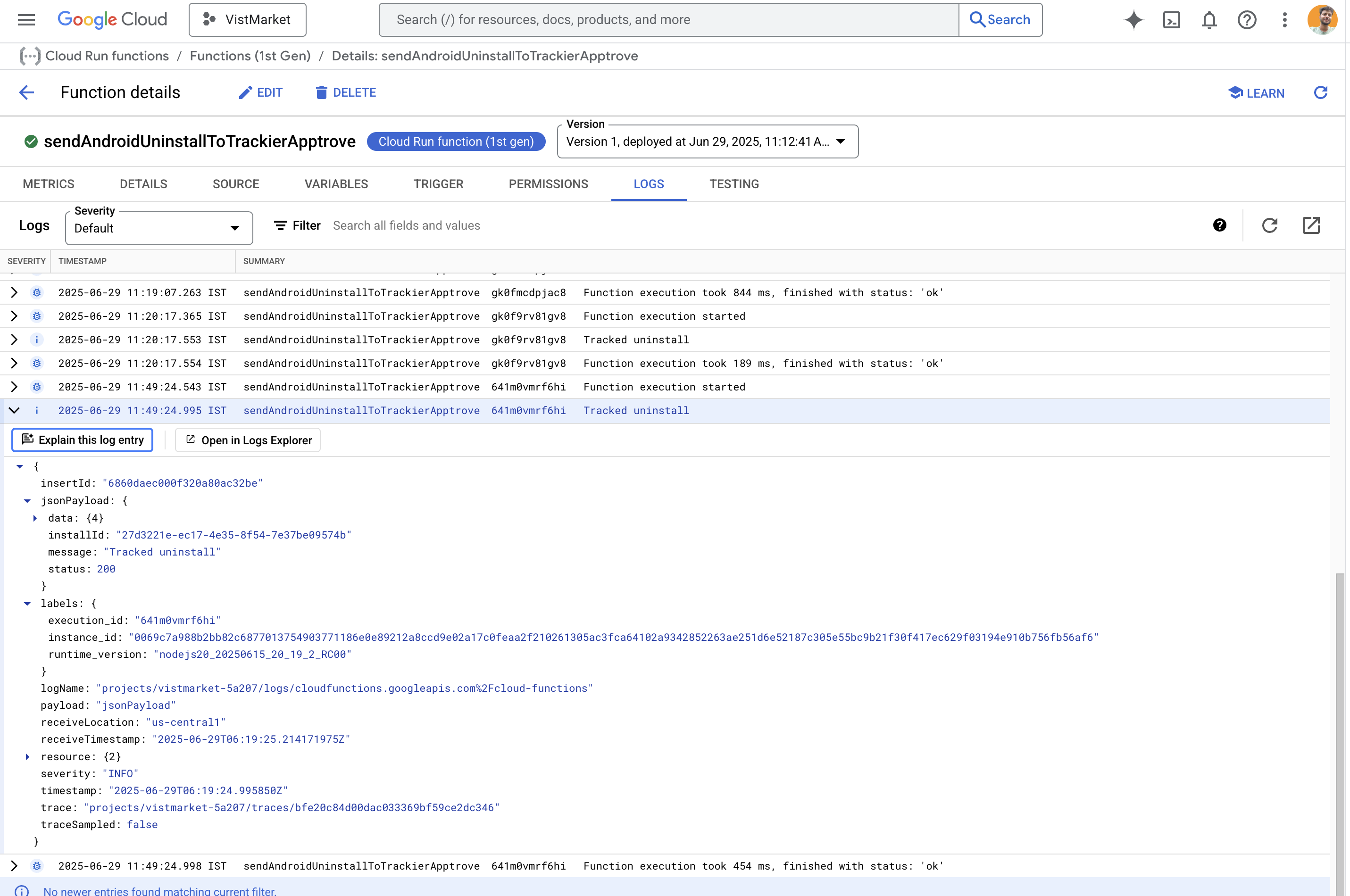
- Look for logs like
Tracked uninstallorUninstall tracking failed
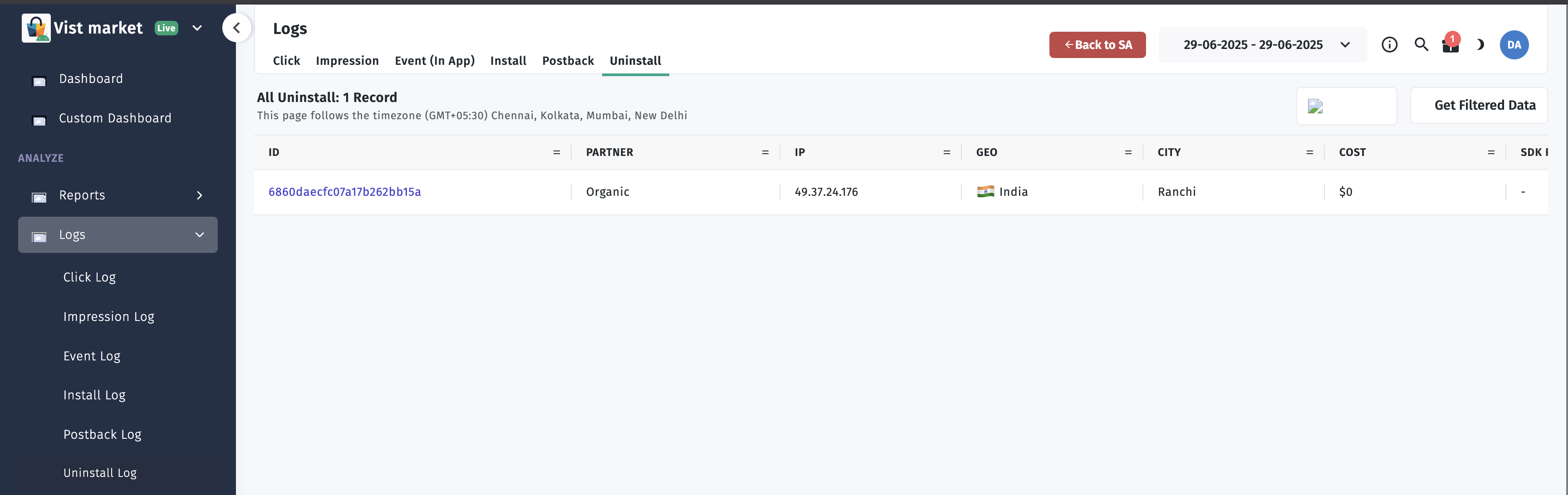
D. Check Trackier Uninstall Log
- Log in to your [Trackier dashboard]
- Navigate to uninstall/event logs
- Filter by
installIdor other user properties - Confirm the uninstall event was received
Troubleshooting & Tips
- Analytics triggers not working?
- Make sure you are on Blaze plan and Analytics is linked
- Only deploy to production (not emulator)
- Use
firebase-functions@3.xandfirebase-admin@11.x
- CPU/Gen 2 errors?
- Remove any
"cpu"option fromfirebase.jsonor CLI flags - Delete the function if it was previously deployed as Gen 2, then redeploy
- Remove any
- Dependency conflicts?
- Downgrade
firebase-adminto^11.0.0if needed
- Downgrade
- Linting errors?
- Use
npm run lint:fixand break up long lines/fix indentation
- Use
- Function not triggering?
- Ensure your app is setting the user property:
mFirebaseAnalytics.setUserProperty("ct_objectId", trackierId) - Use Analytics DebugView to verify the event is sent
- Ensure your app is setting the user property:
- Still stuck?