SDK Signing
SDK Version Selection
Choose your SDK version below:
- Apptrove SDK → Recommended for all projects (Latest: v2.x.x)
- Trackier SDK → Will be deprecated in August 2026 (v1.x.xx)
Use the tabs below to view SDK signing code for your chosen SDK.
SDK signing enhances the security of your Android SDK integration by authenticating API requests with a secretId and secretKey. This ensures that tracking data (e.g., installs, events) is securely attributed to your app, preventing unauthorized access.
Purpose
SDK signing is critical for secure attribution and fraud prevention:
- Authenticates SDK requests to servers using unique credentials
Retrieving Your Secret ID and Key
- Login to your Dashboard and select your application
- In the Dashboard, click the three dots in the left bottom
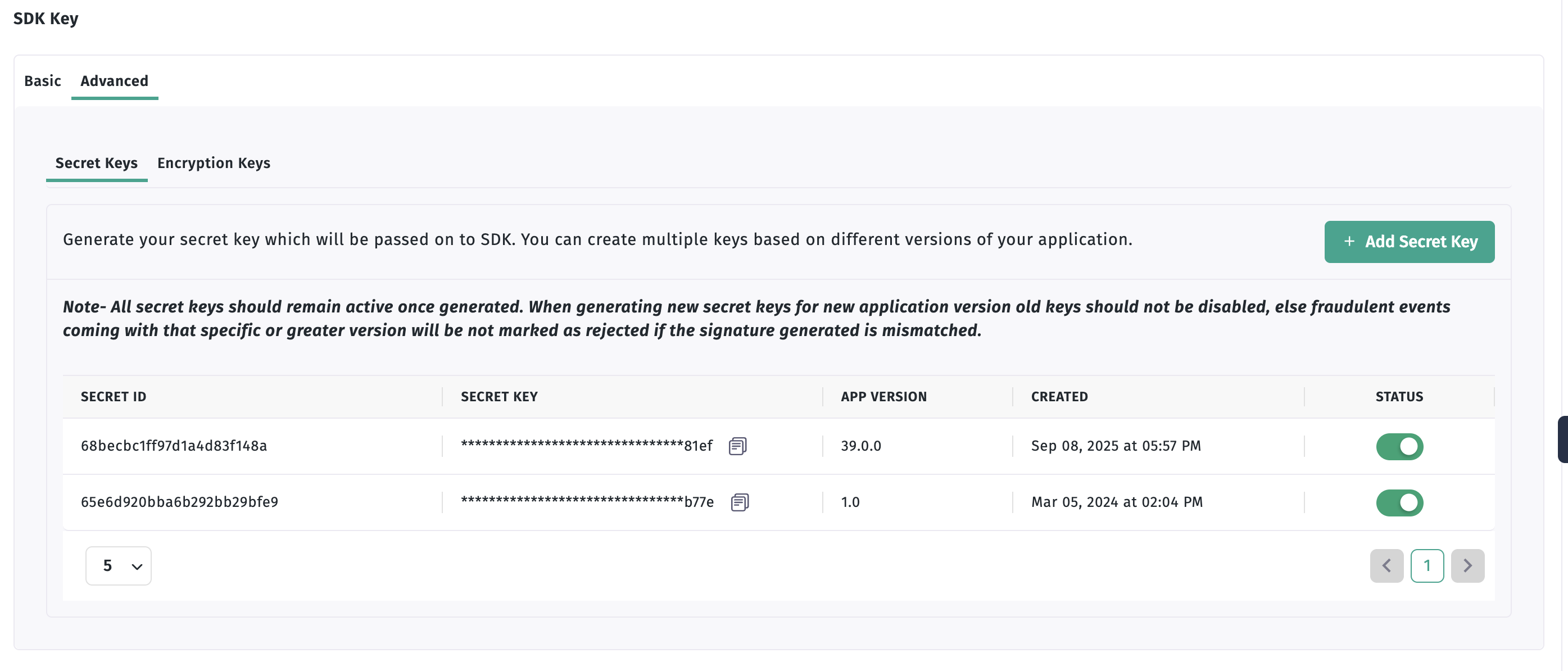
- You can see the SDK key there - click on the "Advanced" tab to generate the ID and Key
- Click on the "Add secret key" button to generate the ID and key
Implementation
- ✓ Apptrove SDK (Recommended)
- Trackier SDK (Deprecating August 2026)
- Java
- Kotlin
import android.app.Application;
import com.apptrove.sdk.AppTroveSDK;
import com.apptrove.sdk.AppTroveSDKConfig;
import java.util.HashMap;

public class MainApplication extends Application {
    @Override
    public void onCreate() {
        super.onCreate();
        final String SDK_KEY = "XXXXXXX-XXXX-XXXX-80e3-5938fadff"; // Please pass your SDK key here.

        /* While Initializing the SDK, You need to pass the three parameters in the AppTroveSDKConfig.
         * In First argument, you need to pass context of the application
         * In second argument, you need to pass the AppTrove SDK api key
         * In third argument, you need to pass the environment which can be either "development", "production" or "testing". */
        AppTroveSDKConfig sdkConfig = new AppTroveSDKConfig(this, SDK_KEY, "development");
        sdkConfig.disableOrganicTracking(true); // Pass true value for disable organic tracking.

        /* For SDK Signing */
        sdkConfig.setAppSecret("xxxx","xxxx-xxx"); // Pass the secretId and secretKey

        AppTroveSDK.initialize(sdkConfig);
    }
}
import android.app.Application
import com.apptrove.sdk.AppTroveSDK
import com.apptrove.sdk.AppTroveSDKConfig

class MainApplication : Application() {
    override fun onCreate() {
        super.onCreate()
        val SDK_KEY: String = "xxxx-xx-4505-bc8b-xx" // Please pass your SDK key here.

        /* While Initializing the SDK, You need to pass the three parameters in the AppTroveSDKConfig.
         * In First argument, you need to pass context of the application
         * In second argument, you need to pass the AppTrove SDK api key
         * In third argument, you need to pass the environment which can be either "development", "production" or "testing". */
        val sdkConfig = AppTroveSDKConfig(this, SDK_KEY, "development")
        sdkConfig.disableOrganicTracking(true) // Pass true value for disable organic tracking

        /* For SDK Signing */
        sdkConfig.setAppSecret("xxxx","xxxx-xxx") // Pass the secretId and secretKey

        AppTroveSDK.initialize(sdkConfig)
    }
}
- Java
- Kotlin
import android.app.Application;
import com.trackier.sdk.TrackierSDK;
import com.trackier.sdk.TrackierSDKConfig;
import java.util.HashMap;

public class MainApplication extends Application {
    @Override
    public void onCreate() {
        super.onCreate();
        final String TR_SDK_KEY = "XXXXXXX-XXXX-XXXX-80e3-5938fadff"; // Please pass your SDK key here.

        /* While Initializing the SDK, You need to pass the three parameter in the TrackierSDKConfig.
         * In First argument, you need to pass context of the application
         * In second argument, you need to pass the Trackier SDK api key
         * In third argument, you need to pass the environment which can be either "development", "production" or "testing". */
        TrackierSDKConfig sdkConfig = new TrackierSDKConfig(this, TR_SDK_KEY, "development");
        sdkConfig.disableOrganicTracking(true); // Pass true value for disable organic tracking.

        /* For SDK Signing */
        sdkConfig.setAppSecret("xxxx","xxxx-xxx"); // Pass the secretId and secretKey

        TrackierSDK.initialize(sdkConfig);
    }
}
import android.app.Application
import com.trackier.sdk.TrackierSDK
import com.trackier.sdk.TrackierSDKConfig

class MainApplication : Application() {
    override fun onCreate() {
        super.onCreate()
        val TR_SDK_KEY: String = "xxxx-xx-4505-bc8b-xx" // Please pass your SDK key here.

        /* While Initializing the SDK, You need to pass the three parameter in the TrackierSDKConfig.
         * In First argument, you need to pass context of the application
         * In second argument, you need to pass the Trackier SDK api key
         * In third argument, you need to pass the environment which can be either "development", "production" or "testing". */
        val sdkConfig = TrackierSDKConfig(this, TR_SDK_KEY, "development")
        sdkConfig.disableOrganicTracking(true) // Pass true value for disable organic tracking

        /* For SDK Signing */
        sdkConfig.setAppSecret("xxxx","xxxx-xxx") // Pass the secretId and secretKey

        TrackierSDK.initialize(sdkConfig)
    }
}